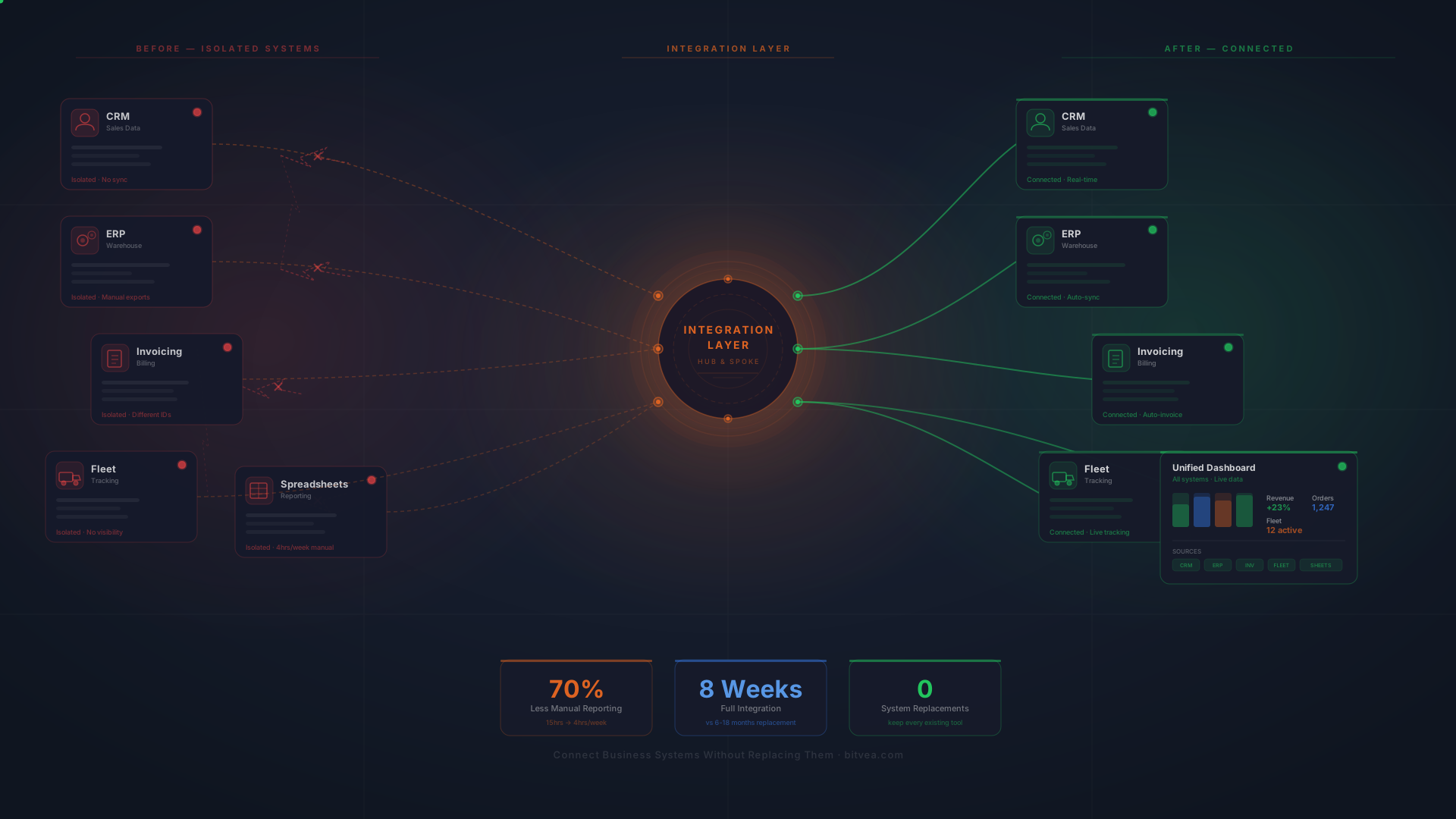
Martin runs a logistics company with 47 employees. His team uses five different platforms every day: a CRM for sales, an ERP for warehouse management, a separate invoicing tool, a fleet tracking system, and spreadsheets for reporting. Every Monday, his operations manager spends four hours copying numbers from one system to another just to prepare a weekly summary.
Martin doesn't hate his tools. They work. The problem is that they don't talk to each other.
If this sounds familiar, you're not alone. The average mid-market company runs between 10 and 30 different software applications. Each one stores critical data in its own silo. And the result is predictable: manual data entry, conflicting numbers across departments, and decisions based on incomplete information. The information usually exists somewhere already, just scattered across systems that never compare notes.
But here's what most companies get wrong. They assume the fix requires ripping everything out and starting over with one massive platform. It doesn't. You can connect business systems you already use, keep the workflows your team knows, and still get a single, accurate view of your entire operation.
This guide breaks down exactly how to do it. No theory. No fluff. Just the practical steps that work, based on real projects we've delivered at Bitvea through our system extension and aggregation service.
Why Data Silos Cost More Than You Think
Data silos form naturally. Your sales team picks a CRM. Finance adopts an accounting tool. Operations builds spreadsheets. Each department optimizes for its own needs, and nobody plans for how data will flow between systems.
The cost sneaks up on you.
IDC estimates that siloed or incorrect data can cost a company up to 30% of its annual revenue. That number sounds extreme until you start counting the hours your team spends reconciling spreadsheets, chasing down conflicting customer records, or rebuilding reports that should generate themselves.
Here's what data silos actually look like in practice:
- Sales closes a deal, but fulfillment doesn't know about it for two days. The order sits in the CRM while someone manually enters it into the ERP.
- Finance can't reconcile invoices because the invoicing tool and the accounting system use different customer IDs.
- Your CEO asks for a revenue report and gets three different numbers from three different departments, each pulling from their own source.
- Customer support can't see order history because it lives in a system they don't have access to.
These aren't edge cases. They're the daily reality for most growing companies. And the pain compounds as you add more tools, more employees, and more data.
The good news: you don't need to replace anything. You need to connect what you already have.
The Integration-First Approach to Business Software
There's a reason the "rip and replace" strategy fails so often. Large-scale platform migrations take 6 to 18 months. They disrupt every team. They require retraining everyone. And roughly 70% of large IT transformation projects fail to meet their goals, according to McKinsey research.
The smarter path is integration-first. Instead of replacing tools, you build a layer that sits between them, moves data automatically, and gives everyone a unified view.
Think of it like building a translator. Your CRM speaks one language. Your ERP speaks another. Your invoicing tool speaks a third. The integration layer translates between all of them in real time so every system has the data it needs, when it needs it.
This approach has three major advantages:
1. Zero disruption. Your team keeps using the tools they already know. No retraining. No adjustment period. No productivity dip during migration.
2. Faster results. A focused integration project takes 1 to 3 months, not 12 to 18. You see value within weeks, not quarters.
3. Lower risk. If something breaks in the integration layer, your source systems keep running. Compare that to a failed ERP migration where everything goes down at once.
Bitvea's approach to custom software development follows this principle: technology should adapt to how you work, not force you to change your processes.
How System Integration Works: A Step-by-Step Breakdown
System integration sounds technical, but the process is straightforward when you break it down. Here is what a real integration project looks like from start to finish.
Step 1: System Audit and Data Mapping
Before connecting anything, you need to understand what you have. This means documenting every system, what data it holds, and how that data currently moves between departments.
A proper audit answers questions like:
- Which systems hold customer data? Do they use the same customer IDs?
- Where does order data originate, and which systems need it downstream?
- What manual processes exist because two systems can't share data directly?
- Which data transfers happen on a schedule, and which need to happen in real time?
This step typically takes one to two weeks. It's the most important phase because it prevents the "we didn't think of that" problems that derail integration projects later.
Step 2: Build the API Integration Layer
With the data map in hand, the next step is building the connectors. Modern API integration connects your systems through a central hub rather than point-to-point links.
Why does this matter? With five systems, point-to-point connections require 10 individual links. With 10 systems, that number jumps to 45. With 20 systems, you are looking at 190 connections to build, monitor, and maintain.
A hub-and-spoke architecture reduces this dramatically. Each system connects to the hub once. The hub handles data transformation, routing, and error handling. Add a new system later, and you add one connection instead of rebuilding the entire network.
The integration layer also handles the messy details that cause most failures:
- Data format translation (converting dates, currencies, units between systems)
- Error handling and retries (what happens when one system is temporarily down)
- Rate limiting (respecting API limits so you don't get throttled or blocked)
- Conflict resolution (deciding which system is the "source of truth" for each data type)
Step 3: Centralized Data Warehouse
Raw connections between systems solve the data flow problem. But for reporting and analytics, you need a single place where all your data lives in a clean, consistent format.
A centralized data warehouse pulls data from every connected system, normalizes it, and stores it in one location. This becomes your single source of truth.
When your CEO asks for that revenue report, there is one number. One source. No conflicting spreadsheets, no "well, it depends on which system you pull from."
Step 4: Unified Dashboards and Automation
With clean, centralized data, you can build dashboards that combine information from every system into one view. Operations sees fulfillment status alongside financial data. Sales sees customer history from the CRM and support tickets from the helpdesk, side by side.
But dashboards are just the beginning. The real power comes from event-driven automation: when something happens in one system, it automatically triggers actions in others.
A new order in the CRM? The ERP creates a fulfillment task, the invoicing system generates a bill, and the customer gets a confirmation email. All without anyone copying data between systems.
If your business is ready for even deeper automation, AI-powered workflows can handle decision-making across systems, not just data transfer.
Real-World Results: From Five Silos to One Dashboard
Theory is nice. Results are better.
A logistics company came to Bitvea with a familiar problem. Five separate platforms: CRM, ERP, fleet management, invoicing, and a custom warehouse tool. Their operations manager, Tereza, spent roughly 15 hours per week pulling data from each system and assembling it into management reports.
Here is what the integration project looked like:
Week 1-2: System audit. We mapped every data flow, identified 23 manual transfer points, and documented where data conflicts occurred most often (customer records and order statuses were the worst offenders).
Week 3-6: Built the API integration layer with a central hub. Each system connected once. Data transformations handled automatically. Error handling and retry logic built in from day one.
Week 7-8: Deployed a centralized data warehouse and built unified dashboards. Tereza's Monday morning report? It now generates itself, pulling live data from all five systems.
The results:
- 70% reduction in manual reporting time. Tereza's 15 weekly hours dropped to about 4, mostly spent on analysis rather than data gathering.
- Real-time visibility across all systems. Management stopped asking "is this number current?" because the dashboard always showed live data.
- Zero system replacements. Every original tool stayed in place. The team kept their existing workflows.
The entire project took 8 weeks. Compare that to the 6 to 12 months a full platform replacement would have required, and the business case for integration becomes obvious.
Common Mistakes That Derail Integration Projects
Not every integration project succeeds. Here are the mistakes that cause the most damage, and how to avoid them.
Skipping the Data Audit
Starting to build connectors before understanding your data is like wiring a house without a blueprint. You'll connect things that don't need connecting, miss critical data flows, and discover halfway through that two systems use conflicting customer identifiers.
Budget two weeks for a proper audit. It saves months of rework.
Building Point-to-Point Instead of Hub-and-Spoke
Direct system-to-system connections work fine when you have two or three tools. But businesses grow. You'll add new software, replace old tools, and expand your tech stack. Point-to-point connections turn into a tangled mess that nobody wants to touch.
One company we spoke with had 14 different point-to-point integrations. When they needed to replace one system, they discovered it would require rebuilding 8 separate connections: technical debt in its most literal form. They had essentially built a trap for themselves.
No Monitoring or Alerting
Here's a pain point that comes up constantly in technical forums: integrations fail silently. Data stops flowing, but nobody notices until a customer complains about a missing order or finance discovers a gap in the records three weeks later.
Every integration needs monitoring. You should know within minutes if a data sync fails, not within weeks. Automated alerts, health checks, and data validation rules are not optional extras. They are essential infrastructure.
Treating Integration as a One-Time Project
Your business changes. You add new tools, modify processes, and scale operations. An integration layer needs ongoing attention: updating connectors when APIs change, adjusting data mappings when business rules evolve, and optimizing performance as data volumes grow.
Plan for ongoing maintenance from the start.
What to Look for in a System Integration Partner
If you are considering connecting your business systems, choosing the right partner matters more than choosing the right technology. Here is what separates good integration partners from bad ones.
They start with your business, not their technology. A good partner asks about your workflows, pain points, and goals before mentioning any specific tools. If the first meeting is a product demo, you are talking to a vendor, not a partner.
They plan for what goes wrong. Error handling, retry logic, monitoring, and alerting should be part of the initial proposal, not afterthoughts. Ask specifically: "What happens when a sync fails at 2 AM on a Saturday?"
They build for change. Your tech stack will evolve. The integration architecture should make it easy to add, remove, or replace systems without rebuilding everything.
They give you ownership. You should own the integration layer, the data warehouse, and the dashboards. No vendor lock-in. No proprietary formats that trap you.
At Bitvea, these principles guide every integration project. If you are dealing with disconnected systems and manual data transfers, let's talk about how to fix it. We will start with a free assessment of your current setup.
Building Your Integration Roadmap
You do not have to connect everything at once. In fact, trying to integrate all systems simultaneously is one of the fastest ways to stall a project, which is why integration comes after the foundations are built in a wider digital transformation roadmap rather than at the start of it.
Here is a practical approach:
Phase 1: Identify Your Biggest Pain Point
Where is your team wasting the most time on manual data transfers? Which disconnected system causes the most errors? Start there. One well-executed integration delivers immediate ROI and builds confidence for the next phase.
For most companies, the CRM-to-ERP connection is the highest-value starting point. Automating the flow from closed deal to fulfilled order eliminates the most common source of delays and errors.
Phase 2: Build the Foundation
Connect your first two or three systems through a central hub. Establish data standards, build your monitoring framework, and deploy your first unified dashboard. This phase creates the architecture that every future integration builds on.
Phase 3: Expand and Automate
With the foundation in place, each additional integration gets faster and cheaper. Add your remaining systems, build cross-system automations, and start using your centralized data for analytics and forecasting.
Most companies complete the full roadmap in 3 to 6 months, with measurable value from Phase 1 within the first few weeks.
If you need a system that goes beyond connecting existing tools and requires building something entirely new, Bitvea's ERP development service can fill that gap while integrating with your existing stack.
Start Connecting Your Systems Today
Every week you spend manually transferring data between systems is a week of preventable waste. Your team's time is better spent on analysis, strategy, and customer service, not on copying numbers from one screen to another.
The tools you have probably work fine for their intended purpose. The problem isn't the tools. The problem is the gaps between them. Closing those gaps through smart integration gives you accurate data, faster operations, and a team that focuses on work that actually matters.
You do not need a massive IT overhaul. You do not need to retrain your entire staff. You need a well-built integration layer that makes your existing systems work together.
Ready to stop fighting your tech stack and start using it as one connected system? Book a free consultation with Bitvea and we'll map out exactly what connecting your systems would look like, what it would cost, and how fast you'd see results. No pressure, no pitch. Just a clear picture of what's possible.