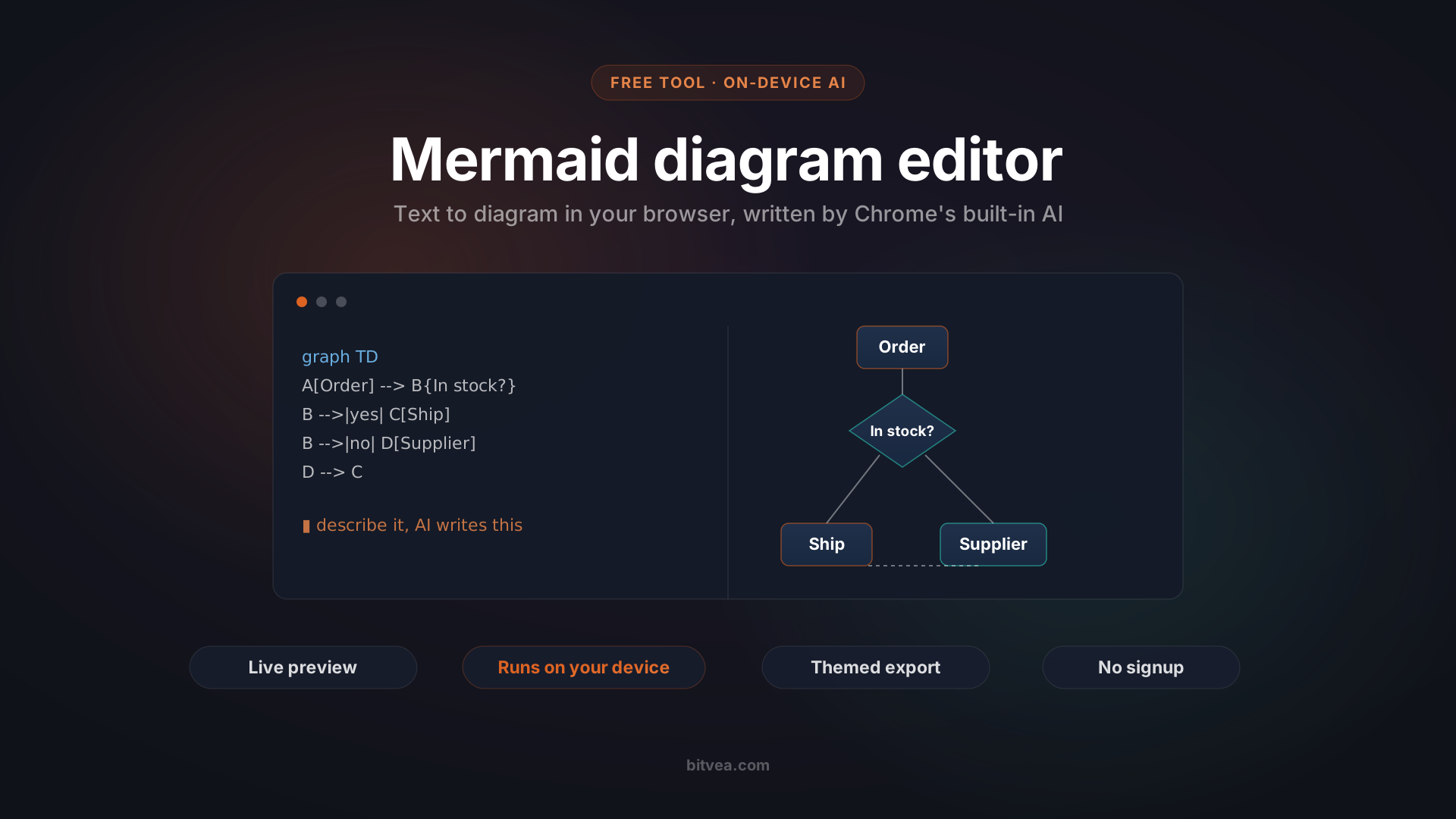
The fastest way to turn a description into a diagram is a free Mermaid diagram editor in your browser that writes the Mermaid code for you, runs the AI on your own machine, and never sends your data anywhere. We built it over a weekend as an experiment with Chrome's new built-in AI. It is live and free, and this is the honest story of how a small annoyance became a working tool. Treat it as an experiment, not a finished product.
It started the way a lot of our internal tools do. We were testing a new model and kept sketching flows as Mermaid diagrams, but there was nowhere convenient to preview them while we worked. So one afternoon we threw together a live preview. It took about as long as a coffee break.
Then the next annoyance showed up, and that one turned out to be interesting.
Key takeaways
- The free Mermaid diagram editor renders live as you type, exports presentation-ready PNG and SVG, and shares a diagram through a single link.
- You can describe a diagram in plain language and Chrome's built-in AI writes the Mermaid for you, with no API key and no usage bill.
- The AI runs fully on your device. Your diagrams and text never leave your browser.
- The AI feature is experimental and works only in recent Chromium desktop browsers (Chrome 138 and up) on capable hardware.
- The whole tool is client-side, so it costs nothing to run and there is no backend to leak your data.
- This is an experiment with Chrome's built-in AI, not a supported product. No SLA, no roadmap.
The annoyance that built a tool
Mermaid is a small text language that turns lines like `A --> B` into flowcharts, sequence diagrams, and more. It is brilliant once you know it. The catch is that you have to know it.
You sit down to map an order process, you know exactly what you want, and then you stall on whether it is `-->` or `->>`, or how to label a decision node. The syntax is easy to forget when you only touch it once a month.
The obvious fix was to let people describe the diagram in plain language and have AI write the Mermaid. The non-obvious part was the constraint we set ourselves: we wanted it genuinely free, with no API bill on our side and nothing sent to someone else's server. That constraint is what made the project worth doing, and it is why this lives as a free public tool instead of a snippet buried in our repo.
Want to skip the story and just use it? The Mermaid diagram editor is here, free and with no signup.
What the Mermaid diagram editor actually does
The tool is a two-pane editor. Mermaid source on the left, the rendered diagram on the right, updating as you type. A few things make it pleasant to live in:
- Live preview with a calm error state. When your syntax breaks mid-edit, it does not flash blank. It keeps the last good diagram on screen and shows the error quietly underneath, so you are never staring at an empty pane wondering what you broke.
- Starter templates for flowchart, sequence, class, ER, and Gantt diagrams, so you are never facing a blank editor.
- Pan and zoom with fit-to-view, so a wide Gantt chart arrives readable instead of microscopic.
- Themes. Six presets plus a custom theme builder where you pick the background gradient, node, accent, and text colors. Your themes are saved in your browser.
- Export that looks finished. PNG and SVG export with the theme background, padding, and a soft shadow baked in, so a diagram is ready to drop into a deck or a doc rather than a bare graph on transparent white.
- Shareable links. The whole diagram, and its theme, is encoded into the URL. Send the link and the other person sees exactly your diagram, with nothing stored on a server.
- Autosave. Reload the page and your work is still there.
When we first wired up the themed export, the test was simple: paste a messy supplier-fallback flowchart, pick the Ocean theme, and hit Download PNG. The image that came out looked like something you would actually paste into a board update. Not bad for a weekend's work.
The interesting part: free, private AI in the browser
Here is the feature we are most pleased with. Type something like "order process with a stock check and a supplier fallback," press Generate, and a diagram appears. No API key. No per-token bill. Nothing uploaded.
That works because of a genuinely new capability in the browser. Chrome now ships a small language model, Gemini Nano, and exposes it to web pages through the Prompt API. According to the Chrome Prompt API documentation, this has been available to websites since Chrome 138. The model runs on the user's own device.
For a free public tool, that on-device design is the whole game:
- It costs us nothing to run. There is no inference server, no API invoice, no rate limit to manage at peak hours.
- Your data stays with you. The text you type and the diagram you get back never touch a network. For anyone sketching internal systems or sensitive workflows, that matters.
- It degrades gracefully. The Generate box only appears when the browser actually has the model and reports it as usable. Everyone else just sees the normal editor. This is the responsible way to ship a brand-new browser feature: as a bonus for the people who can use it, never as a wall for the people who cannot.
This is the same pragmatic view of AI we bring to client work. We are far more interested in AI agents that quietly automate real tasks than in AI as a headline. A model that writes diagram code locally, for free, is a small and very concrete example of that.
An important, honest disclaimer
The AI generation is experimental. Be clear-eyed about where it works:
- It runs only in recent Chromium-based desktop browsers, Chrome 138 and up, on Windows, macOS 13 and up, Linux, or Chromebook Plus.
- It needs a capable machine: roughly 22 GB of free disk space and a recent GPU or 16 GB of RAM.
- It downloads a multi-gigabyte model the first time you use it.
- It is not available on most phones, and not on Safari or Firefox today.
We treat it as a glimpse of where browsers are heading, not a feature you can rely on everywhere yet. The editor itself, the part you will use every day, works in any modern browser. Only the AI box is gated.
A few things this experiment taught us
The story most engineers will care about is in the details. Three of them are worth writing down.
Small models need guardrails, not blind trust
Gemini Nano is small, so we never trust its output as-is. The pipeline around the model is what makes it usable:
- Prompt the model with the user's description.
- Strip any stray markdown fences it adds.
- Validate the result with Mermaid's own parser before showing it.
- If parsing fails, hand the error back to the model for exactly one self-correction pass.
- If it still fails, show a friendly message and leave your editor untouched.
That validate-and-retry loop is the difference between a cool demo and something you can actually use. The model is a helpful drafter, not the final authority. The parser is.
The tainted-canvas bug
Exporting a PNG means drawing the diagram onto a hidden canvas and saving it. It kept failing in Chrome with a blunt error: "Tainted canvases may not be exported."
The cause took a minute to pin down. Mermaid was rendering text labels inside an embedded HTML element (a `foreignObject`), and the browser treats that as a security taint on the canvas, which blocks the export. The fix was to force Mermaid to render labels as real SVG text instead of embedded HTML. As a bonus, the text now survives the PNG export cleanly and stays selectable in the SVG. If you ever see a tainted-canvas error exporting an SVG that looked perfectly local, this is a good first thing to check.
One frame, three exports
PNG, SVG, and copy-to-clipboard all run through a single function that wraps the diagram in its themed frame: gradient background, padding, soft shadow. The PNG is just a high-resolution rasterization of that exact framed SVG. The payoff is that all three outputs are identical to each other and to the live preview. What you see is genuinely what you export, with no second code path to drift out of sync.
To be clear, this is an experiment, not production software. No SLA, no support, no roadmap. We did add a handful of browser tests for the parts that kept breaking, mainly the export paths and the tainted-canvas bug, so later changes would not quietly undo what already worked. But it is something to explore, not a tool to build your workflow on.
Try the Mermaid diagram editor and tell us what it should do next
The editor is live and free. Open the Mermaid diagram editor, pick a template, and start typing, or describe a diagram and let the browser write it for you. It sits alongside the rest of our free tools.
If there is one thing to take away beyond the tool itself, it is this: the best experiments start as a fix for a real, specific annoyance, and it is worth seeing how far a new browser capability can go. A live preview solved one problem. On-device AI solved the next. A validate-and-retry loop kept the AI in check. None of it was a grand plan, just one friction point at a time.
Client work is different. There we notice where your day actually snags, build the smallest sharp tool that removes it, and then make it solid enough to depend on. Sometimes that is a custom system built around how you really work. Sometimes it is a quiet AI agent doing a job nobody should have to do by hand.
The Mermaid diagram editor was a quick experiment. If you have a workflow that needs its own small, sharp tool built properly, tell us about it. We like this kind of problem.