Your sales team is tracking deals across email, spreadsheets, and sticky notes. Nobody knows the real pipeline status. Opportunities slip through the cracks. Leads go cold because nobody remembers to follow up. And when a salesperson leaves, they take months of relationship history with them.
This is the chaos that precedes a CRM. Not because your team is disorganized, but because manual tracking tools break at scale. As soon as you have more than a few salespeople or a few dozen active deals, you need a system that keeps everything visible in one place.
A CRM system is that place. This article explains what a CRM actually does, what types exist, when you need one, and how to know if it is time to buy or build.
What Is a CRM System?
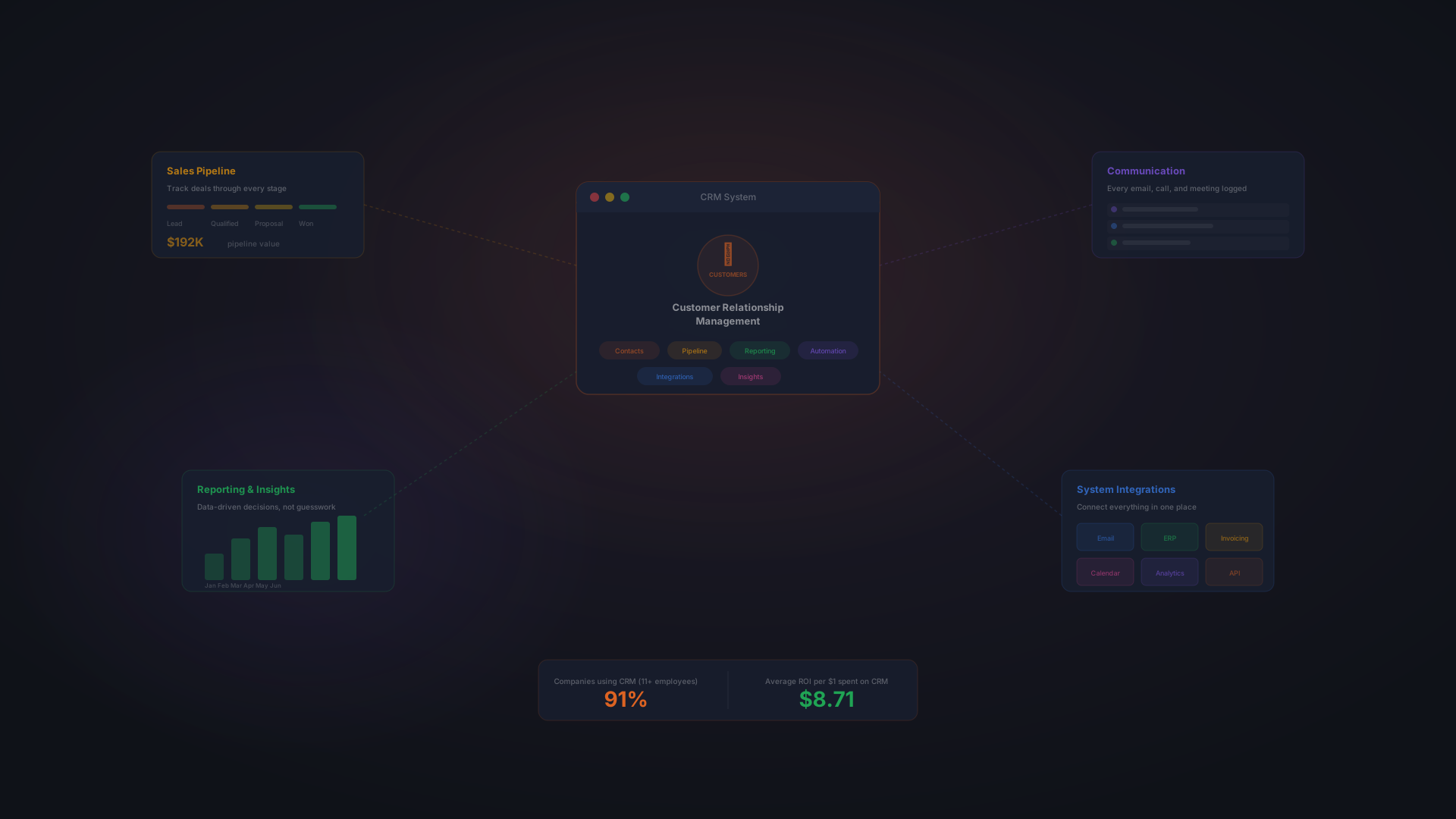
CRM stands for Customer Relationship Management. At its core, it is a central hub that stores all your customer and prospect data in one place, and helps your team work with that data consistently.
A CRM is not a contact list. A contact list is a phone number and an email address. A CRM is the entire relationship: every deal you have discussed, every email you have sent, every conversation, every next step, every price quote, every objection, and where that prospect stands in your sales process right now.
The system lets your team log interactions, track deals as they move through your pipeline, see what is happening across the entire business, and automate routine work so salespeople spend time selling, not administering.
The numbers show why this matters. 91% of companies with 11 or more employees use a CRM. That adoption reflects a simple reality: once you have multiple salespeople, email and spreadsheets stop working. The visibility breaks. Communication gets missed. And decisions are made on incomplete information.
A CRM solves that visibility problem. It creates a single source of truth for where every customer and prospect stands.
Core Functions of a CRM
Data Organization
A CRM centralizes all customer information in a single structured database. Instead of contacts spread across email, spreadsheets, and personal notes, you have one record per customer with all relevant details.
Data lives in custom fields. Standard fields include name, email, and phone. But a CRM also stores industry, company size, decision maker name, budget, buying timeline, previous interactions, product interests, and anything else specific to your business.
Example: A logistics software company might track company size, number of trucks, current routing software, and contract renewal date. A law firm might track case type, opposing counsel, and key dates. The fields match the data your team needs.
Sales Pipeline Management
A CRM visualizes your deals as they move through your sales process. Most systems use a pipeline view, stages displayed as columns, with deals shown as cards or rows that move from left to right as they progress.
Typical stages are: Prospecting → Qualification → Proposal → Negotiation → Closed Won. But your stages match your actual process. A long-cycle B2B software sale might have eight stages. A quick transactional sale might have three.
As a deal moves through stages, you update its status in the CRM. This gives management real-time visibility into pipeline health. How many deals are in proposal? How much revenue is at risk? What is the probability of hitting quota this quarter? A CRM answers those questions instantly.
Communication Tracking
A CRM logs every interaction: calls, emails, meetings, notes. When you open a customer record, you see the entire conversation history, not scattered across email folders, but timestamped and centralized.
This prevents the "I thought you already told them that" problem. It ensures that if a salesperson leaves or goes on vacation, the next person knows exactly what has been discussed and what is the next action.
Reporting and Insights
A CRM surfaces data that would be invisible in spreadsheets. Dashboards show pipeline health, win rates by stage, sales cycle length, forecast accuracy, and individual salesperson performance.
You can answer questions like: How long does an average deal take to close? Which products have the highest margin? Who are our best customers? What is our customer retention rate? These insights drive strategy.
Integration With Other Tools
Modern CRMs connect with the tools you already use: email, calendar, accounting software, invoicing systems, ERP platforms, marketing automation tools, and payment processors.
Example: When an invoice is created in QuickBooks, it automatically links to the CRM deal. When a deal closes, the system can automatically trigger an invoice. When an email arrives, it can auto-log to the associated contact record.
These integrations eliminate manual data entry and keep information in sync across systems.
Why Your Business Needs a CRM
The Cost of Not Having One
Without a CRM, deals fall through cracks. A salesperson sends a proposal and then forgets to follow up, a month passes and the lead has moved to a competitor. Opportunities are lost because nobody knows when to call back.
When a top salesperson leaves, your company loses months of relationship knowledge. The new hire has no idea which prospects are warm, which need gentle nurturing, and which are completely cold. That knowledge walks out the door.
Management makes decisions on partial information. You do not know your real pipeline. You do not know your win rate. You do not know which products are most profitable or which customers are most loyal. You are flying blind.
The Case for a CRM
- Visibility. Everyone knows the real pipeline status, forecast, and health.
- Efficiency. Salespeople spend time selling, not hunting for information.
- Consistency. Every deal follows your process. Nothing is missed by chance.
- Customer retention. When you know every interaction, you can serve customers better and spot churn risk early.
- Team coordination. Handoffs happen smoothly because all context is in one place.
- Growth. You can identify what is working and scale it.
The return on investment is significant. According to industry data, CRM delivers $8.71 in value returned for every $1 invested. That return compounds over time.
How a CRM Works in Practice
Here is a five-step walkthrough of how a CRM operates in a real sales process:
Step 1: Enter Customer Data
A prospect reaches out or you find them at a trade show. You create a new contact record in the CRM with their name, company, email, phone, industry, and relevant details. You also log the first interaction, how they came in, what they need, what was discussed.
Step 2: Track All Interactions
Every email sent to that prospect gets logged. Every call gets recorded in notes. Every meeting gets added to the timeline. The contact record becomes a living history of the relationship.
Step 3: Move the Deal Through the Pipeline
As the conversation progresses, you move the deal from "Prospecting" to "Qualified," then to "Proposal," then to "Negotiation." You set a target close date. You note any objections or concerns. You set the deal probability.
Step 4: Get Insights
A dashboard shows your manager that you have three deals in "Proposal," two in "Negotiation," and one at risk of closing late. The forecast shows expected revenue for the quarter. Your team lead can see which deals need attention and which are on track.
Step 5: Close and Integrate
When the deal closes, you mark it "Closed Won." The CRM automatically sends a signal to your accounting system to create an invoice. The customer is moved to a "customers" list. Follow-up automations trigger. A success team is notified to begin onboarding.
Types of CRM Solutions
SaaS CRM (Off-the-Shelf)
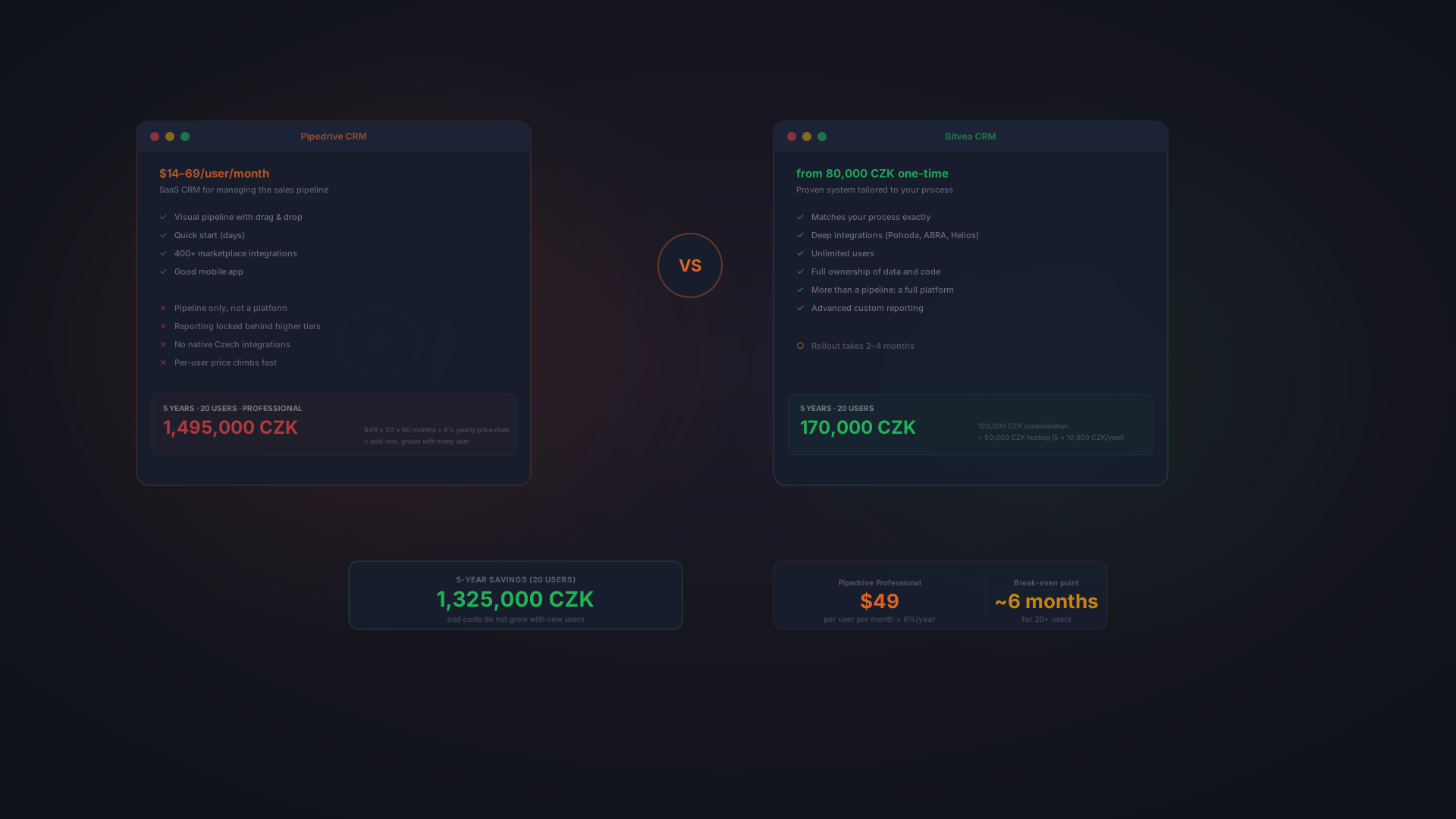
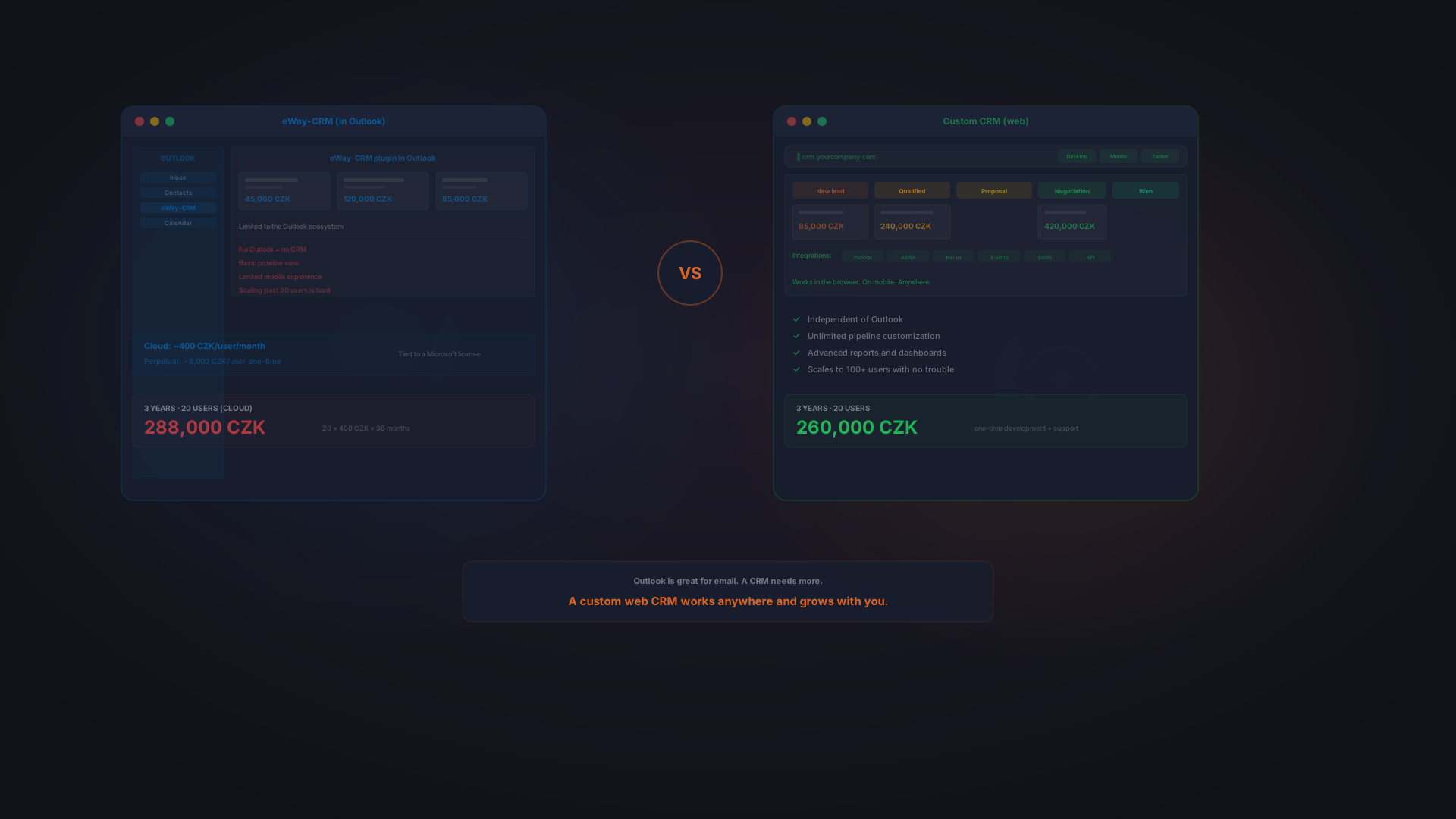
SaaS CRMs like HubSpot, Pipedrive, Raynet, and Zoho are off-the-shelf platforms hosted in the cloud. You pay a monthly or annual subscription, log in, and start using. For a head-to-head with a custom build, see custom CRM vs Pipedrive.
- Fast to start. Weeks to go live, not months.
- Low upfront cost. Predictable subscription pricing.
- Built-in features. Reporting, automation, mobile app all included.
- Easy to scale. Add seats easily as your team grows.
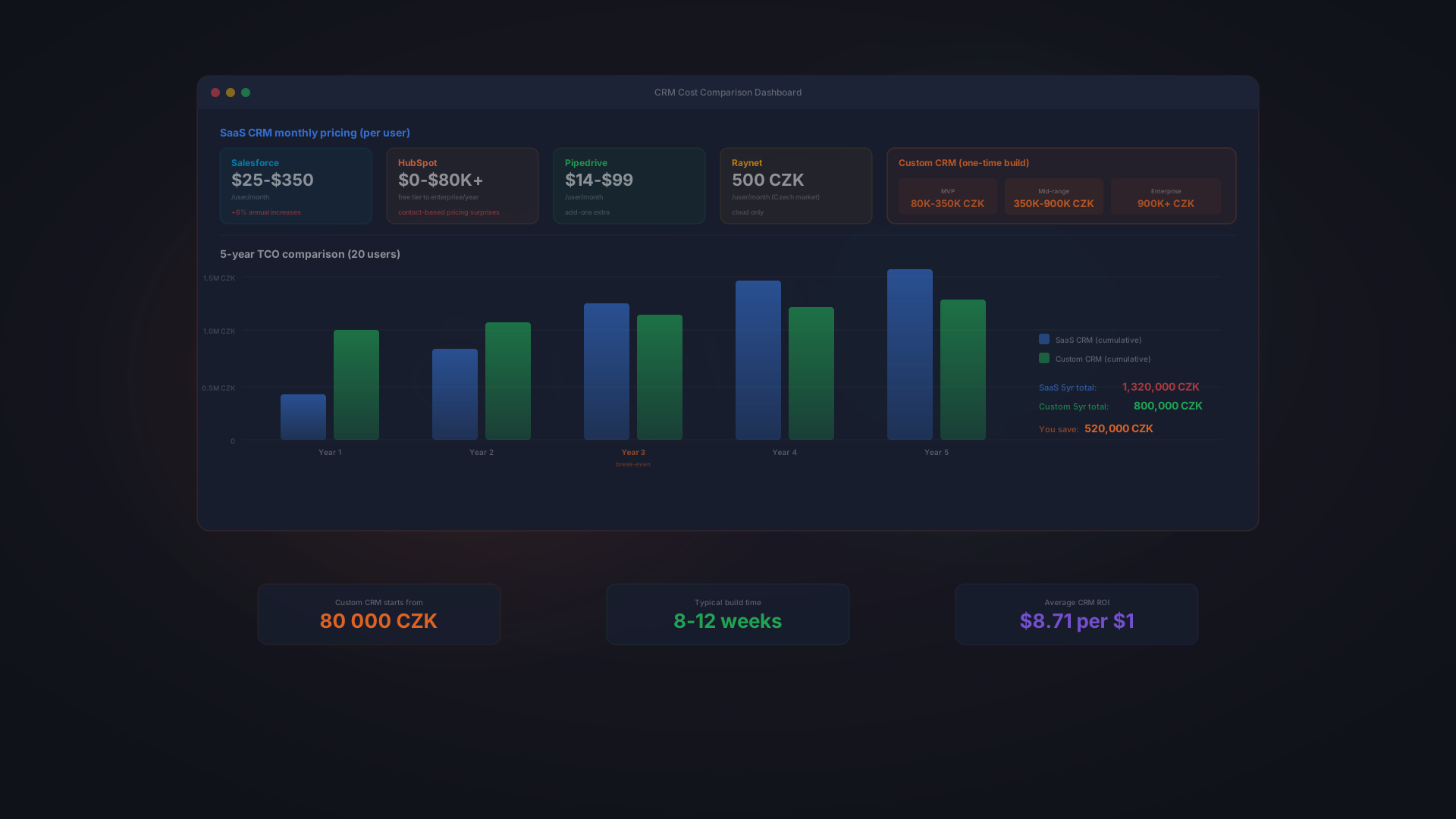
The trade-off: You fit into the vendor's design. Customization is limited. Integrations with legacy systems can be expensive. You do not own the data; you rent access to it. And pricing compounds: 10 users at $100/month each equals $12,000/year. In five years, with annual increases, you might be paying $15,000+/year for the same seats.
Custom CRM (Built for You)
A custom CRM is built specifically for your business. It is designed around your actual sales process, your data model, your integrations, and your workflow, not around a generic template.
- Perfect fit. Built for your process, not adapted to someone else's.
- Full ownership. You own the software and the code.
- Deep integrations. Connects directly to your ERP, accounting, or legacy systems without expensive middleware.
- No lock-in. You can modify, extend, or move your data whenever you want.
- Long-term cost advantage. No recurring licensing fees; fixed development cost amortized over time.
The trade-off: Higher upfront investment and longer development timeline. You need to articulate your requirements clearly. And you own the ongoing maintenance and support. Our guide to building a custom CRM covers the phases, the realistic cost range, and how to tell whether you are a good candidate.
Hybrid CRM (Pre-Built Base + Customization)
A newer approach combines the best of both: a pre-built CRM base that is already deployed and battle-tested, customized around your specific process. This gives you the speed and lower cost of SaaS with the ownership and control of custom.
- Faster delivery. Built on a proven foundation, not from scratch. Typically 2–4 months to launch.
- Lower risk. The core system is stable; only your workflows and integrations are new.
- You own it. Full code ownership; you are not locked into a vendor.
- Unlimited users. No per-seat fees. Add your entire team without cost scaling.
- Reasonable upfront cost. Starting from 80,000 CZK (~$3,300) for small implementations.
- Fixed ongoing cost. Hosting and maintenance around 10,000 CZK/year, not monthly subscriptions.
This approach works best for companies that need customization but want to avoid the complexity and timeline of building from scratch. You get the clarity of a custom system with the speed and lower cost of a pre-built product.
Quick Comparison: All Three
Dimension | SaaS | Custom | Hybrid |
|---|---|---|---|
Time to launch | 2–4 weeks | 12–16 weeks | 2–4 months |
Upfront cost | Low ($0–5k) | Very high (200k+ CZK) | Moderate (80k+ CZK) |
Annual cost | Recurring subscription | Hosting + maintenance only | Hosting + maintenance only |
Customization | Limited | Complete | High |
Deep integrations | API-based, pricey | Native, built-in | Native, built-in |
Data ownership | Vendor owns it | You own it | You own it |
Scaling cost | Increases per seat | No per-seat fees | No per-seat fees |
Lock-in risk | High | None | None |
Best for | Quick start, standard process | Complex unique needs | Custom needs + faster delivery |
When Do You Actually Need a CRM?
Signs You Are Ready
- 5 or more salespeople. Teams larger than this cannot coordinate on spreadsheets.
- Deals slipping through cracks. You miss follow-ups because you forget to call back.
- No pipeline visibility. Management does not know the real forecast.
- Multiple channels. You sell via email, phone, in-person, social media, and tracking is chaotic.
- Data lives in email. All deal history is scattered across inboxes.
- Departing salespeople take knowledge. When someone leaves, you lose relationships.
When You Might Not Need One Yet
If you have one or two salespeople, a very simple sales process, long contract cycles with few moving parts, or a team that is naturally organized, you might manage with spreadsheets and email for now. But be honest about whether you are truly organized or just lucky.
Most founders reach the point where a CRM becomes essential by the time they have 5+ salespeople. At that scale, the cost of not having visibility becomes higher than the cost of implementing one.
Common Myths About CRM
Myth 1: "CRM Is Only for Big Companies"
False. Small teams benefit most from CRM because chaos scales fastest in small organizations. A two-person startup might not need CRM. A 10-person sales team absolutely does.
Myth 2: "CRM Is Complicated to Set Up"
SaaS CRM is not. You can be live in a week. Custom or hybrid CRM takes longer because you are building something specific, but the complexity is upfront planning, not implementation pain.
Myth 3: "CRM Forces You to Change Everything"
A well-designed CRM fits your process, not the other way around. Good CRM implementation is about digitizing what you already do, not forcing you to sell differently.
Myth 4: "CRM Is Only for Sales"
Modern CRM systems also track customer success, support interactions, and marketing touchpoints. The system spans the entire customer lifecycle.
Frequently Asked Questions
What Does a CRM Cost?
SaaS CRM typically runs $50–300 per user per month, depending on features. A 10-person team might spend $6,000–36,000 per year. Custom CRM costs significantly more upfront but owns the code. Hybrid CRM (pre-built base plus customization) starts from 80,000 CZK with hosting and maintenance around 10,000 CZK/year. Over five years, hybrid and custom approaches often have lower total cost of ownership despite higher upfront spend. For a full price breakdown across every major platform, see our complete CRM pricing guide for 2026.
How Long Does a CRM Take to Implement?
SaaS CRM: 2–4 weeks. Hybrid CRM: 2–4 months. Full custom: 12–16 weeks. The timeline depends on complexity and how much customization you need. Simple processes move faster; complex ones with multiple integrations take longer.
Can a CRM Integrate With My Accounting Software?
Usually, yes. Most SaaS CRMs have integrations with QuickBooks, Xero, and SAP. Custom and hybrid CRMs can integrate with anything. But some legacy accounting systems require custom integration work, which adds cost and time.
What If My Sales Process Is Unusual?
Standard SaaS CRM can handle a surprising range of processes with configuration. But if your process is truly unique, think complex approval workflows, industry-specific fields, or tight ERP integration, hybrid or custom CRM becomes more attractive because the tool is built for you, not adapted from someone else's template.
How Do I Convince My Team to Actually Use the CRM?
Adoption happens when the system saves time and makes people's jobs easier. If your CRM creates friction, if it is slower to log a deal in the system than to email a note, people will use workarounds. The best CRM implementations prioritize ease of use and eliminate manual data entry.
Can I Switch CRM Systems Later?
You can migrate data from one SaaS platform to another, though it is messy. With hybrid and custom CRM, you own the data, so switching is entirely under your control. This is one reason custom and hybrid approaches avoid vendor lock-in.
What About Data Security and Privacy?
SaaS CRM vendors typically offer SOC 2 compliance and encryption in transit and at rest. Custom and hybrid CRM security depends on how it is built, but you have full control over where data lives and how it is protected. All approaches can be secure if implemented correctly, and because you hold the code, a custom CRM can be verified with a white-box security test rather than only probed from the outside.
The Bottom Line
A CRM is not a nice-to-have once your sales team hits a certain size. It is essential. The question is not whether you need one; it is which type fits your business.
If you have a standard sales process, want to launch fast, and do not mind recurring licensing fees, SaaS CRM is the right choice. If you have a complex process, unique data requirements, deep integrations, or a long-term vision that includes full control and ownership, hybrid or custom CRM makes sense.
Either way, the moment you have more than a few salespeople and deals, choosing visibility over chaos is not optional. A CRM gives you that visibility.
Bitvea builds CRM systems tailored to how you actually sell. We offer both a pre-built hybrid approach (starting from 80,000 CZK with 2–4 month delivery) and fully custom builds. Unlimited users, full code ownership, no per-seat fees. Want to discuss whether a custom or hybrid CRM makes sense for you?
Schedule a free consultation to talk through your sales process and CRM needs.
Part of a topic guide