The CRM market is worth $112.91 billion. And yet 55% of CRM implementations fail. Those two facts tell you something important: companies are not struggling to find a CRM, they are struggling to get one that actually works for their business.
When you sit at a leadership table today and someone mentions CRM, the conversation usually lands in one of two places: either you are renewing your Salesforce or HubSpot contract, or you are watching your team work around your current CRM. Spreadsheets still run your pipeline. Deals do not get logged. Data lives in three places, and nobody trusts any of them.
The standard response is to upgrade your SaaS platform. Add more users, buy more integrations, hire a consultant to configure it better. But there is a different path that most companies never explore: a pre-built CRM system, customized specifically for how you sell.
This is not a polemic against SaaS. SaaS CRM is the right choice for many businesses. But the decision between custom and SaaS is not obvious, and the numbers matter more than the brand. This article walks through the honest comparison: what each option actually delivers, what it costs over five years, and how to know which one makes sense for your company. For hard pricing data across every major CRM, see our complete CRM pricing guide for 2026.
What SaaS CRM Gives You (And Where It Falls Short)
SaaS CRM platforms have real, concrete advantages. Dismissing them would be dishonest.
The primary advantage is speed to productivity. Salesforce, HubSpot, Pipedrive, and Raynet all ship fully functional systems. You sign up, configure a few fields, and your team can start logging deals within hours or days. There is no development. No discovery phase. No waiting for a build.
This speed matters. For a business that needs a CRM tomorrow because you are growing fast and losing deals, buying a SaaS solution is a rational move.
The second advantage is the breadth of integrations. Salesforce connects to thousands of third-party applications through AppExchange. HubSpot's ecosystem is equally mature. If you want to wire your CRM to your invoicing system, your support desk, or your marketing automation platform, the integration already exists and is maintained by someone else.
The third advantage is vendor support. You have a team behind the platform, releasing new features, fixing bugs, managing security updates, and maintaining uptime. You do not have to manage infrastructure.
But these advantages come with costs that are often invisible in the initial pricing conversation.
The SaaS CRM Cost Problem: Per-User Pricing
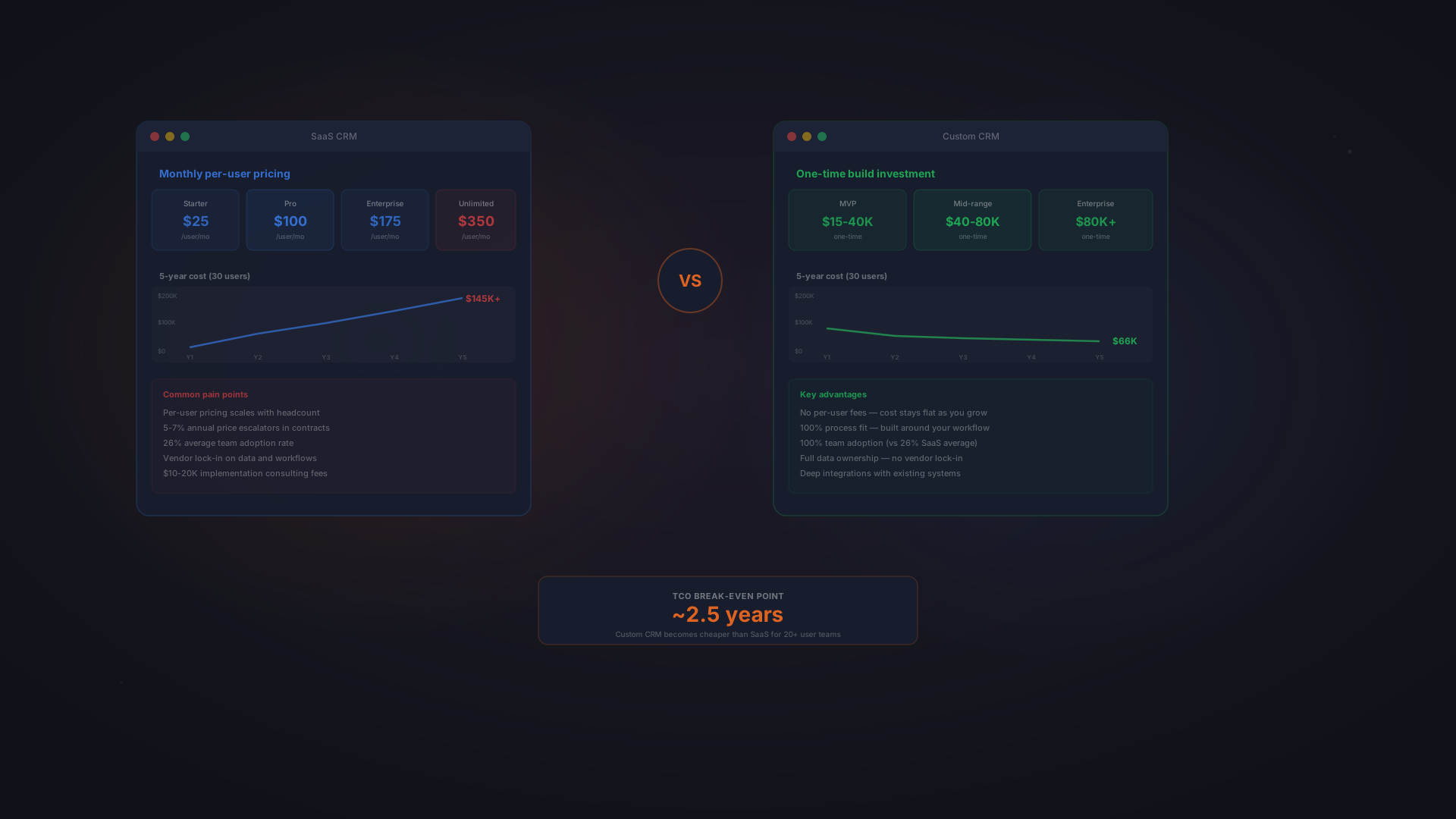
Salesforce charges $100 to $330 per user per month, depending on edition. HubSpot Professional is $800 to $3,000 per month for a team of varying sizes. Raynet, popular in the Czech market, runs 500 CZK per user per month, and eWay-CRM around 400 CZK on its Standard tier, which sounds cheaper until you add up 20 users.
Per-user pricing creates a structural cost problem: as your team grows, your CRM cost grows linearly. Hire five new salespeople, and your annual Salesforce bill increases by $60,000. Hire ten, and it increases by $120,000.
This is especially painful when you consider the way teams actually use CRM systems. In many organizations, not everyone needs full CRM access. You might have customer support staff, operations people, or account managers who only need to view or read data, not modify it. Yet SaaS platforms charge the same rate whether you use 10% of the system or 100%.
The pricing also includes hidden escalation. Salesforce increases its per-user cost by an average of 6% annually. HubSpot has raised prices multiple times in the past five years. These increases are not optional. You accept them or you leave.
Customization: The Slow Tax
SaaS platforms are built around a generic sales model. Leads come in, they move through stages, deals close. If your sales process matches that model exactly, you are fine. If it does not, if you have complex approval workflows, industry-specific data requirements, or a sale cycle that does not fit standard stages, you will spend months configuring.
Configuration work is expensive. A Salesforce administrator or consultant charges $75 to $150 per hour. Building custom fields, setting up workflows, creating reports, and integrating third-party tools can easily consume hundreds of hours. By the time your SaaS system actually fits your business, you have already spent $20,000 to $50,000 on configuration work alone.
And when your process changes, because every business eventually changes how it sells, you are back to the same problem. You need configuration work. You need maintenance. You need to hire consultants again.
Vendor Lock-In: The Long-Term Cost
When you build your data inside a SaaS platform, exporting it later is difficult. Salesforce does not make it simple to take your customer data and move to another system. The platform has API limits. Migration is complicated and costly. So, effectively, you are locked in.
This lock-in has a cost. If Salesforce doubles its pricing and you want to leave, you cannot. You have too much invested. The switching cost is too high. Salesforce knows this, and it factors into how they increase prices.
The Middle Path: Pre-Built, Customized CRM
There is a third option that sits between pure SaaS and building from scratch: a pre-built CRM system that is customized around your specific sales process. This approach takes the speed advantage of a ready-made system and combines it with the fit advantage of custom software.
With a pre-built customized CRM, you start with a proven base system that already handles the core CRM functions: deal tracking, pipeline management, activity logging, reporting. Then, instead of forcing your process to fit the platform, the platform is adapted to fit your exact sales cycle, your unique data requirements, and your reporting needs.
The result is deployment speed (2-4 months, not 6-12) combined with perfect process fit and full code ownership. This is the best-of-both-worlds option that most businesses have never heard of.
- Speed of a ready product, from 80,000 CZK, 2-4 month delivery
- Customization without limits, your exact sales process, data model, and workflows
- Unlimited users, no per-seat fees; cost stays flat as you grow
- Full code ownership, you own the system; no vendor lock-in
- Flat-rate support, ~10,000 CZK/year hosting and maintenance (~$400/year)
- Real adoption, because the system is built for how you actually work
- Competitive edge, your CRM can do things competitors cannot because it is built just for you
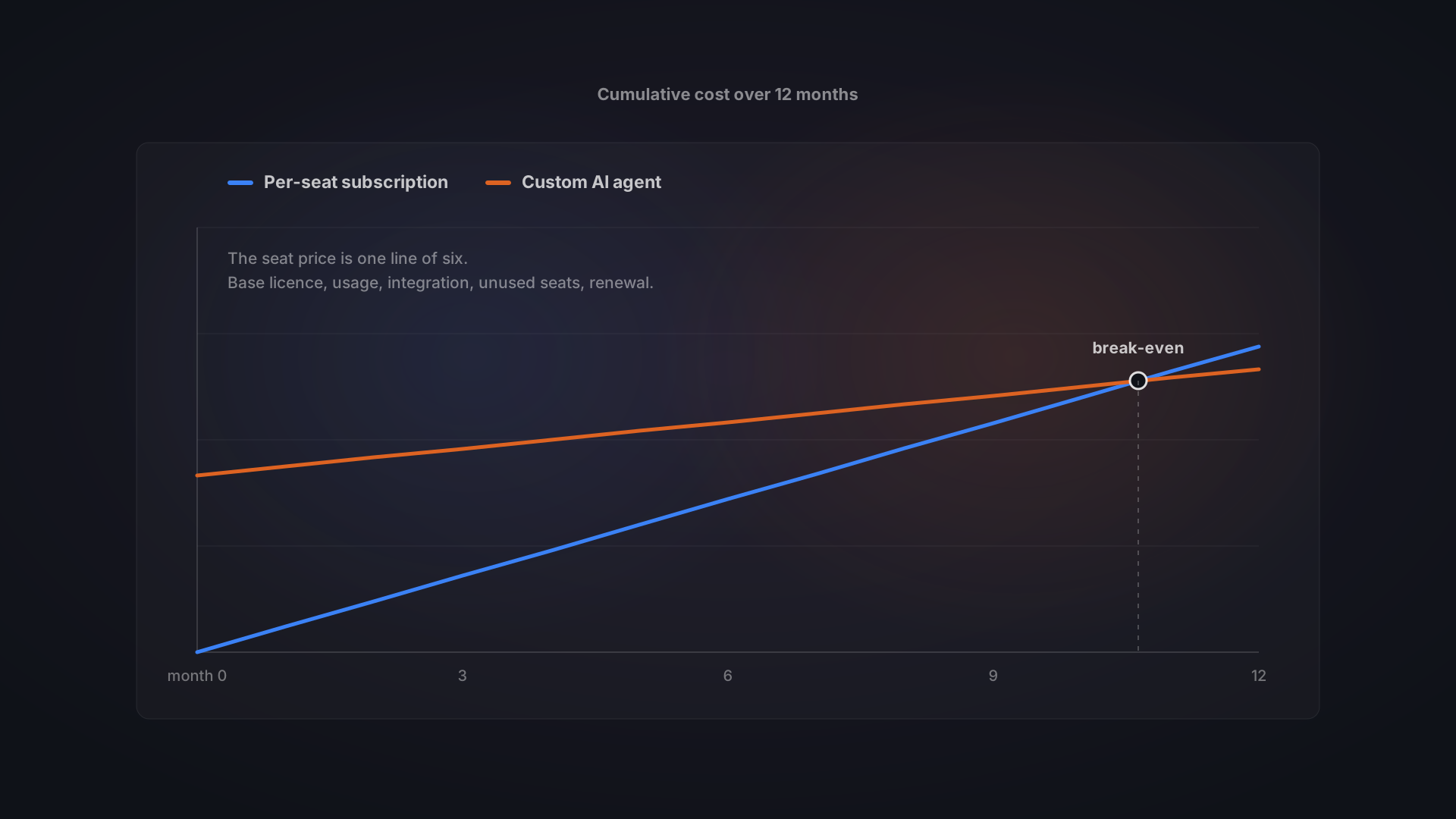
This approach flips the economics. Your cost is front-loaded at build time, then stays flat. SaaS cost compounds every year. The break-even point is typically 18-24 months, after which every month you save money.
Head-to-Head Comparison: SaaS vs Pre-Built Custom
Here is how the two models compare across the dimensions that matter most when making this decision.
Dimension | SaaS CRM (e.g., Salesforce, HubSpot) | Pre-Built Custom (e.g., Bitvea CRM) |
|---|---|---|
Initial cost | $0-5,000 for setup and configuration | 80,000-150,000 CZK (~$3,500-6,500 USD) |
Monthly cost (20 users) | 500 CZK × 20 = 10,000 CZK/month | 10,000-15,000 CZK/month support + hosting |
Implementation time | 1-4 weeks (minimal) | 2-4 weeks (customization of proven base) |
Customization ease | Configuration only; limited customization | Full customization of base; perfect fit |
Process fit | Fits generic sales model; you adapt to it | Built around your exact sales process |
Integrations | Pre-built integrations available; costs add up | Custom integrations built for your needs |
Data ownership | Vendor controls data; exit is costly | You own everything; easy to move if needed |
Vendor lock-in | High; switching cost is substantial | None; you control your own destiny |
Scaling cost | Linear; cost increases per user added | Flat; adding users costs nearly nothing |
Long-term maintenance | Vendor maintains; you configure as needs change | You maintain or via support contract; evolves with business |
Support model | Vendor support; may not understand your context | Dedicated support; context-aware and aligned |
Feature roadmap | Vendor controls roadmap; you adapt to changes | You control roadmap; changes on your timeline |
Security & compliance | Vendor-managed; one-size-fits-all approach | Built to your specific security & compliance needs |
Training effort | Users learn to adapt to system | System fits how people already work; minimal training |
Five-year cost (20 users) | ~2,500,000-3,000,000 CZK + add-ons | ~300,000-400,000 CZK build + ~600,000 CZK support = ~1,000,000 CZK |
The pattern is clear: SaaS excels in speed and out-of-the-box capability. Pre-built custom excels in fit, ownership, scalability, and long-term cost control.
Five-Year Total Cost of Ownership: The Real Comparison
The most honest way to compare these options is over the timeframe you actually plan to use the system. For most companies, that is at least five years.
SaaS CRM: Five-Year Cost (20-Person Team)
Using Salesforce Pro Suite as an example:
- Year 1: 20 users × $100/user/month × 12 months = $24,000 USD (~540,000 CZK)
- Year 2: $24,000 × 1.06 (price increase) = $25,440 USD (~572,000 CZK)
- Year 3: $25,440 × 1.06 = $26,967 USD (~607,000 CZK)
- Year 4: $26,967 × 1.06 = $28,585 USD (~643,000 CZK)
- Year 5: $28,585 × 1.06 = $30,300 USD (~681,000 CZK)
- 5-year Salesforce total: ~$131,292 USD (~2,943,000 CZK)
This does not include add-ons (Salesforce Cloud for integration, advanced automation), configuration consulting, or implementation. Add a realistic $20,000 for setup and $10,000 annually in consulting and admin work, and the five-year cost rises to approximately $181,292 USD (~4,073,000 CZK).
Pre-Built Custom CRM: Five-Year Cost (20-Person Team)
Using Bitvea's customized CRM as an example:
- Development (2-4 weeks): 100,000 CZK (~$4,300 USD)
- Year 1 hosting & support: 12,000 CZK (~$520 USD)
- Year 2 hosting & support: 12,000 CZK (~$520 USD)
- Year 3 hosting & support: 12,000 CZK (~$520 USD)
- Year 4 hosting & support: 12,000 CZK (~$520 USD)
- Year 5 hosting & support: 12,000 CZK (~$520 USD)
- 5-year pre-built custom CRM total: ~160,000 CZK (~$6,900 USD)
The key insight: custom CRM cost is front-loaded (the customization phase) but stays flat afterward. SaaS cost is low up front but compounds every year. The savings gap grows every month.
The Break-Even Point
For a 20-person team, the pre-built custom CRM breaks even with Salesforce around month 18-24. After that point, every month you run custom, you save money compared to SaaS.
For larger teams, the break-even point arrives faster. A 50-person team breaks even in 12-15 months. For smaller teams (5 people), it takes longer, but if your business is growing and you plan to be at 20+ people within a few years, custom still wins.
The five-year TCO advantage for pre-built custom is roughly 3,000,000-4,000,000 CZK, or, put another way, you could build a fully customized system for what you would spend on Salesforce for a single team over five years.
Real-World Example: 30-Person Sales Team Cuts Costs by 80%
A 30-person B2B software sales team was paying $36,000 annually for Salesforce Professional. They had been on the platform for three years, and adoption was still sitting at 22%.
Salespeople found the interface slow. Logging activities took three clicks and a form. The pipeline view did not match how deals actually moved through their sales cycle. So they maintained their own pipeline in a shared spreadsheet. Management had no real visibility. Nobody knew which deals were at risk or how the quarter was actually trending.
They decided to build a customized CRM. The requirements were straightforward:
- A five-stage pipeline matching their actual sales cycle
- One-click deal logging and activity recording
- Automated follow-up reminders based on deal stage
- Direct integration with their invoicing system
- A management dashboard showing pipeline health and at-risk deals in real time
The customized system was built in 10 weeks from kickoff to go-live. The results:
- 40% shorter deal cycle, automated follow-ups eliminated the gaps between touchpoints
- 87% adoption rate, the system fit how the team actually worked, so they used it without being told
- 100% pipeline visibility, management could see every deal in real time
- $36,000 saved annually, no more Salesforce subscription
- Break-even in 10 months, the one-time customization cost was recovered in less than a year
The 40% shorter deal cycle is the number that compounds. Faster deals mean more revenue. For a B2B company with an average deal size of $50,000, compressing the sales cycle by 40% can mean two to three additional deals per quarter, easily $300,000 to $500,000 in incremental revenue annually.
When Pre-Built Custom CRM Makes Sense
Pre-built custom CRM is not the right choice for every business. It makes the most sense when most or all of these criteria apply:
- Your sales process is unique or complex, You have a sale cycle that does not fit the standard lead-to-deal-to-close model. Multi-stakeholder approval, multi-touch cycles, or industry-specific requirements.
- You are already customizing your SaaS heavily, You have spent thousands on configuration, and the platform still does not quite fit. That is a signal that custom might be more cost-effective.
- You have 15+ people in the core CRM-using team, The per-user economics of SaaS start to work against you at this scale. Custom becomes the cheaper option.
- You need deep integrations, Your CRM needs to sync closely with your ERP, invoicing system, or operations platform. Custom integrations are often simpler and cheaper than buying middleware.
- You plan to use the system for 5+ years, Custom CRM's advantage compounds over time. If you are planning on a shorter timeframe, SaaS is still probably the better choice.
- You want full code ownership, Vendor lock-in bothers you. You want the freedom to switch tools, pivot your business model, or move data without permission.
- You have grown out of SaaS, Your team is large enough that per-user fees are eating into your margins. The economics of custom make financial sense.
If most of these describe your situation, pre-built custom CRM is worth serious consideration.
When SaaS CRM Is Still the Better Choice
There are also situations where a SaaS CRM is the clear winner. Be honest about which category you are in.
- You need a CRM today, You are growing fast, you are losing deals because you have no pipeline visibility, and you need something in place in the next 1-2 weeks. SaaS is the only answer.
- Your sales process is generic, If your sales cycle looks like most B2B SaaS companies (Prospecting > Qualified > Proposal > Closed), Salesforce or HubSpot will fit with minimal configuration.
- Your team is small (under 10 people), The per-user cost of SaaS is reasonable at small scale. The customization cost of pre-built custom is harder to justify.
- You are still in startup mode, You are pre-product-market fit, your process changes every quarter, and you do not have the stability or budget for a custom system.
- You want a managed vendor, You prefer to not own the infrastructure, not manage updates, and not be responsible for security patches. You want that to be someone else's job.
- You need extensive third-party integrations, If you use 8+ other SaaS tools and you need them all connected, the pre-built integration ecosystem of Salesforce or HubSpot saves you months of development.
- You have a hard budget ceiling, If your CRM budget is $2,000-5,000 annually (not per user, but total), you have no choice but SaaS.
SaaS CRM is a pragmatic choice for many situations. The decision is not "custom or SaaS", it is "which option delivers the best ROI for my business in my current situation?"
Common Objections to Custom CRM, Answered
Objection 1: "Custom CRM Is Too Expensive"
This objection is based on comparing the initial customization cost ($100,000) to the first-year SaaS cost ($24,000). The comparison is wrong because it ignores the three remaining years when you are still paying SaaS but the custom system cost was already recovered.
The right comparison is five-year total cost of ownership. Across that timeframe, pre-built custom costs roughly one-quarter of what you would pay for Salesforce. If you are expecting to use the system for longer than five years, the advantage only grows.
Additionally, the custom CRM cost is one-time. You are not making recurring per-user payments to a vendor. The investment compounds in your favor every year.
Objection 2: "Custom CRM Takes Too Long"
A pre-built CRM with customization can be deployed in 2-4 weeks. That is actually faster than a serious Salesforce implementation with configuration, training, and data migration.
The difference is that a pre-built custom CRM is ready to use immediately. A Salesforce implementation at 12 weeks is often still in configuration. The real go-live timeline for pre-built custom is much faster.
If you truly need a system in 1-2 weeks, yes, pure SaaS wins. But if you have 2-4 weeks, pre-built custom is feasible and the system will fit your process perfectly.
Objection 3: "Who Maintains It After Customization?"
Your pre-built CRM is built on a standard technology stack, typically Next.js or React for the frontend, Node.js for the backend, and PostgreSQL for the database. Any competent developer can maintain and improve it.
You have two options:
- Hire a developer on staff, You add one engineer to your team. They maintain the system, implement new features, and support your team. Cost: $30,000-50,000 annually.
- Hire a support vendor, You sign a support contract with the development company that customized the system (or a similar firm). They handle maintenance, updates, and new features on an hourly or monthly basis. Cost: $10,000-15,000 annually.
Either way, your total cost stays well below what you would pay for SaaS.
Objection 4: "We Might Change Our CRM Later"
You might. But with a pre-built custom CRM, changing your mind is easy. You own your data. You can export it and move to any other system whenever you want. Switching does not lock you in or cost you thousands in migration consulting.
With SaaS, switching is harder. Your data is locked inside Salesforce. Moving it is complicated and risky. You are incentivized to stay even if your needs change.
Pre-built custom gives you optionality. SaaS takes it away.
Objection 5: "We Do Not Have Technical Expertise In-House"
You do not need to. You hire a development partner like Bitvea to customize the pre-built system for you. They handle the technical work. You own the result. Your CRM is not dependent on your internal engineering capacity; it is dependent on having a good vendor relationship.
Most successful pre-built custom CRM deployments are at companies with zero engineers on staff. The system becomes their competitive advantage.
Decision Framework: How to Choose
If you are still torn between custom and SaaS, use this framework to clarify your decision:
Question 1: How Much Time Do You Have?
If you need a CRM in the next 2 weeks: SaaS.
If you have 2-4 weeks: Consider pre-built custom.
If you have more than 4 weeks and are not in a time crunch: Pre-built custom is the best option.
Question 2: How Unique Is Your Sales Process?
If your sales process is standard (leads > deals > close): SaaS works.
If your process is unique or you are customizing heavily: Pre-built custom pays for itself.
Question 3: What Is Your Team Size?
Under 10 people: SaaS is cheaper.
10-20 people: Break-even zone; depends on uniqueness.
Over 20 people: Pre-built custom TCO is significantly better.
Question 4: Do You Want to Own Your Data?
If vendor lock-in does not bother you: SaaS is fine.
If you want full ownership and optionality: Pre-built custom is necessary.
Question 5: What Is Your Five-Year Plan?
If your business will look completely different in five years: SaaS is more flexible.
If your current business model will still be running: Pre-built custom makes financial sense.
If you answer yes to "unique sales process," "15+ team members," and "5+ year horizon," pre-built custom CRM is worth building.
How to Get Started with Pre-Built Custom CRM
If you are leaning toward custom, here is how to evaluate whether it makes sense for your business:
Step 1: Audit Your Current CRM
Answer these questions:
- What is your current CRM? Or are you using spreadsheets?
- How much are you paying annually?
- What is your adoption rate?
- What is broken about your current system?
- What would an ideal CRM let you do that your current system does not?
Step 2: Document Your Sales Process
Write down the exact stages your deals go through. Write down what data you need to track. Write down what reports matter to management. This is the foundation of any CRM customization. If you cannot articulate your process, a vendor cannot customize a system for it.
Step 3: Get a Rough Estimate
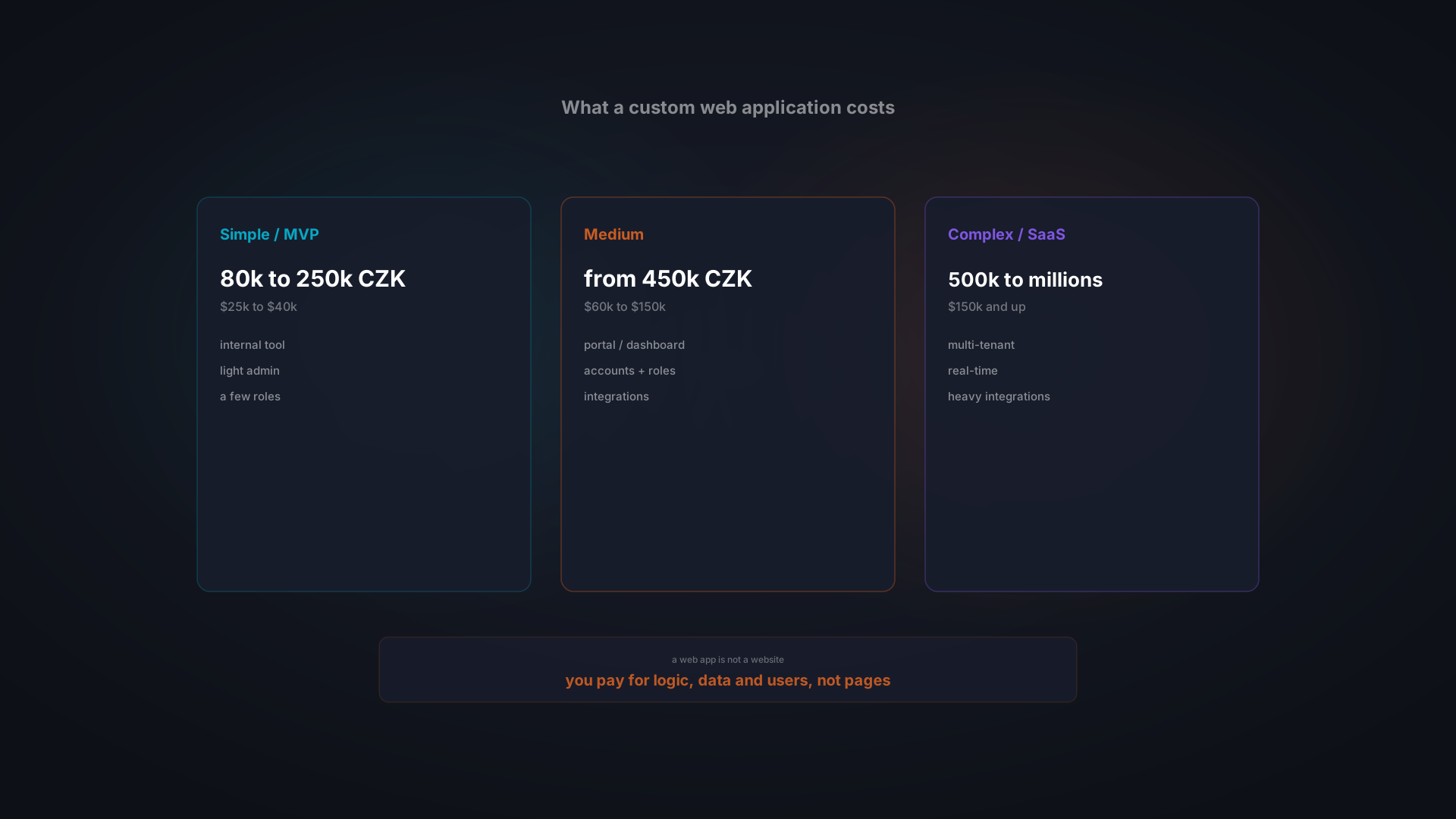
Talk to a development vendor like Bitvea and ask for a rough estimate. A typical pre-built custom CRM starts at 80,000 CZK (~$3,500 USD), depending on complexity and integrations. Bitvea typically delivers in 2-4 weeks.
Compare that estimate against your five-year SaaS cost. If custom is cheaper over five years, it makes financial sense.
Step 4: Run the Numbers
Do the math. How many people will use the system? What is your SaaS cost today? What will it be in five years? How much will pre-built custom cost? What is the break-even timeline?
The financial case should be clear. If it is not, SaaS is probably the right choice for now.
Bitvea's Pre-Built Customized CRM
Bitvea builds pre-built CRM systems that are customized specifically for how your business operates. Our approach is straightforward:
- Discovery, We spend 1-2 weeks understanding your exact sales process, your data requirements, and your goals.
- Customization, We take our proven CRM base and customize the pipeline stages, data model, workflows, and reporting to match your exact needs.
- Deploy, We test with your team, migrate your existing data, and train your salespeople.
- Support, We offer ongoing support and feature development on an as-needed basis.
Pre-built customized CRM from Bitvea starts at 80,000 CZK. The exact cost depends on how many integrations you need, how complex your sales process is, and what reporting features matter most to your team.
The key advantage over pure custom development is speed: you are not building from scratch. You are starting with a proven system and customizing it. Deployment takes 2-4 weeks instead of 8-12 weeks. Cost is lower. Risk is lower. Results are faster.
Learn more about our custom CRM service.
The Bottom Line
The choice between pre-built custom CRM and SaaS is not emotional. It is financial and operational.
If you have a standard sales process, a small team, and you need something fast, SaaS CRM (Salesforce, HubSpot, Pipedrive, Raynet) is the right choice.
If you have a unique sales process, a growing team, and you are planning to be in business for the next 5+ years, a pre-built CRM customized specifically for your business will cost less and work better.
The break-even point is typically 18-24 months. After that, custom CRM is structurally cheaper, and the gap widens every year.
If you are curious whether pre-built custom CRM makes sense for your business, the next step is simple: have a conversation with someone who has built them. We are happy to talk through your situation, estimate the cost, and help you understand the real five-year financial picture.
Book a free consultation to discuss your CRM options.
Part of a topic guide