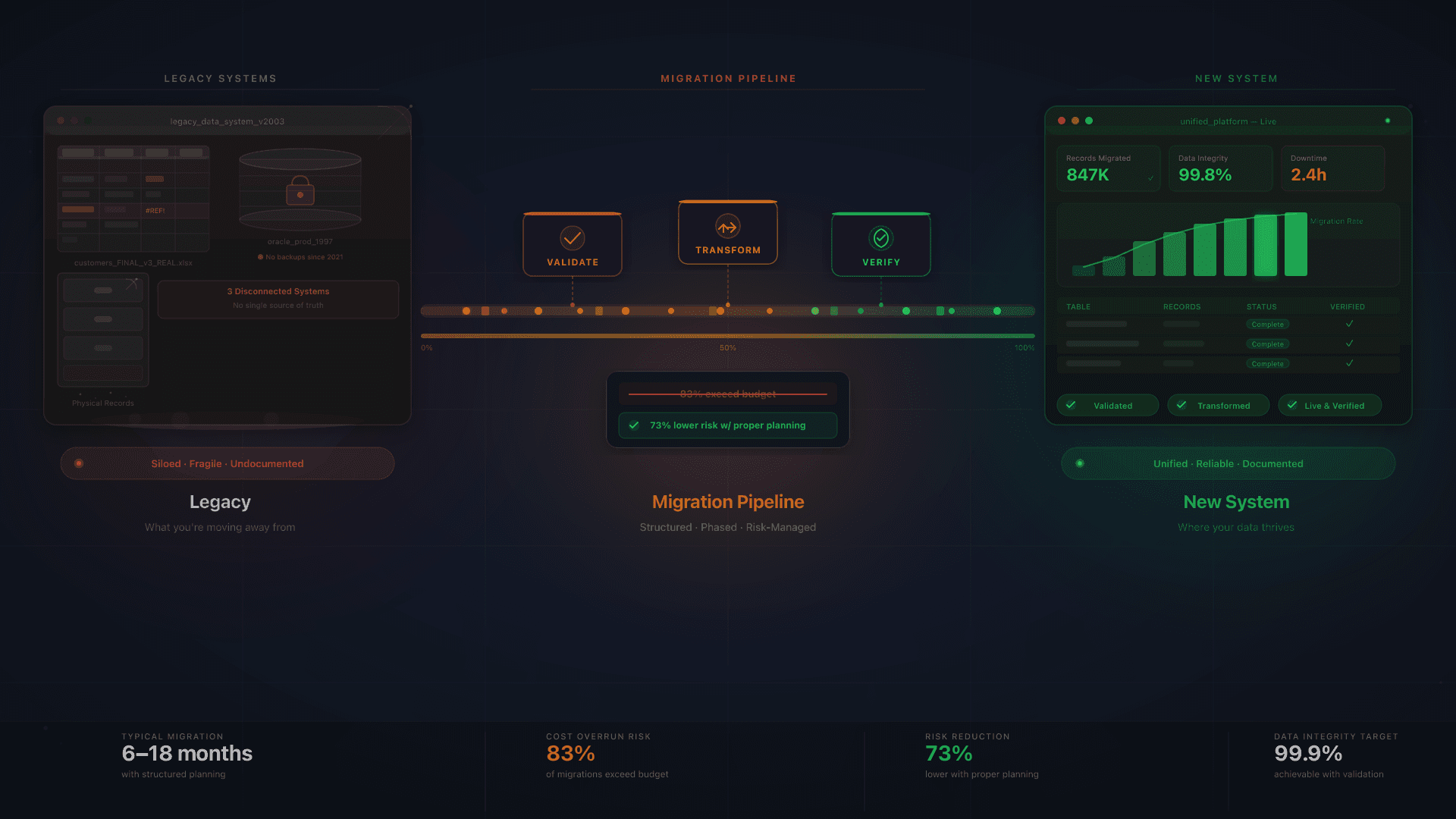
"We can't switch systems. We'll lose all our data." We hear this in almost every discovery call. And the fear is not unreasonable: over 83% of data migration projects exceed their original budget or timeline, and 60% of first-attempt legacy migrations fail outright. But here is what those statistics do not tell you: data migration failure rates drop by 73% with proper planning. The difference between a disaster and a smooth transition is not luck. It is methodology.
Data migration from legacy systems is the most underestimated phase of any software modernization project. It is not a copy-paste job. It is the process of understanding, cleaning, restructuring, and validating business-critical data, often data accumulated over a decade across spreadsheets, old databases, and disconnected SaaS tools. Getting it wrong means starting your new system on a foundation of garbage. Getting it right means you end up with cleaner, more reliable data than you have ever had.
At Bitvea, we have run this process across multiple real projects: migrating a 30-person sales team from Salesforce and parallel spreadsheets to a custom CRM with 100% data integrity in 10 weeks, consolidating e-commerce order data from manual spreadsheets and disconnected tools into a unified system, and centralizing invoice data from scattered document stores into an AI-powered processing platform. This guide is built on those real-world experiences.
What Is Data Migration and Why Does It Matter?
More Than a Copy-Paste Job
Data migration is the process of moving data, business logic, and processes from old systems to new ones. That definition sounds simple. The reality is that legacy systems accumulate complexity over years: undocumented relationships between fields, formulas embedded in spreadsheet columns that nobody remembers creating, naming conventions that evolved across teams, and business rules that only exist in someone's head.
The three source types Bitvea encounters most often reflect the reality of small and mid-size businesses across Europe: spreadsheets (the most common, and the most dangerous, since they hide enormous business logic), legacy databases (older systems running on outdated infrastructure), and old SaaS platforms (tools the business has outgrown, where the export formats are never quite right).
If you recognize the "spreadsheet ceiling," the point where your Excel-based processes start creating more risk than they resolve, you are not alone. Thousands of growing businesses reach it every year. The question is not whether to migrate, but how to do it without losing what matters.
The Real Cost of Doing Nothing
The argument for staying on legacy systems is almost always about avoiding migration risk. But the cost of staying is substantial and mostly invisible. Enterprises allocate 60–80% of IT budgets to maintaining legacy systems: budget that cannot be redirected to building new capabilities. Legacy systems require 3–4x more maintenance hours than modern platforms. And according to IDC, by 2026, 60% of organizations failing to modernize will struggle with privacy, data residency, and financial accountability compliance.
For European businesses, that compliance angle is not abstract. GDPR protection travels with your data, and migrating to a modern, properly architected system with EU data residency is not just a technical upgrade. It is a compliance posture. The EU AI Act takes full effect in August 2026, adding new requirements for AI-driven decision explanations. Organizations running on legacy infrastructure will find these obligations significantly harder to meet.
Why Data Migration Projects Fail
The Statistics Are Sobering
The failure numbers are worth sitting with before jumping to solutions. Beyond the headline 83% figure, the picture is consistent: 84% of migrations are affected by poor data quality at some stage. 40% of ERP implementations exceed their budgets specifically because of data migration complications. 61% of migration projects exceed planned timelines by 40–100%. These are not outliers. They are the default outcome when migration is treated as an afterthought rather than a project in its own right.
Five Root Causes of Migration Failure
- No data audit upfront. You cannot migrate what you do not understand. Hidden business logic in spreadsheets, undocumented data relationships, and inconsistent naming conventions all become expensive surprises mid-project.
- Dirty data migrated as-is. Duplicates, missing fields, inconsistent formats. Migrating garbage into a clean system does not clean the garbage. It just moves it somewhere newer.
- No rollback plan. If something breaks on go-live, can you revert? Most teams cannot answer this question. Without a rollback strategy, a migration problem becomes a business crisis.
- Big Bang when phased was needed. Trying to migrate everything at once over a single weekend when the data volume and complexity called for an incremental approach.
- Treating it as an IT project, not a business project. No stakeholder involvement, no user validation, no change management. The people who know the data best, the people who use it every day, are not in the room.
The 73% Solution: Why Planning Changes Everything
The 73% reduction in failure rates with proper planning is not marketing language: it is the most useful number in migration planning. It tells you that the outcome is controllable. The variable is not the complexity of your data; it is the thoroughness of your methodology. Every section below is about that methodology.
Want to know where your data stands before committing to a migration? We start every project with a free data audit. It takes one week and tells you exactly what you are working with.
The Bitvea Migration Methodology: 5 Phases That Work
Phase 1: Discovery and Data Audit (Weeks 1–2)
The audit is where migrations go right or wrong. Before any code is written or any data is moved, we map every data source: spreadsheets by tab and formula complexity, databases by table and relationship, SaaS exports by field availability, even paper records where they exist. We catalog data relationships and dependencies. We identify data quality issues (duplicates, missing required fields, formatting inconsistencies) before they become migration problems.
The most important output of Phase 1 is the documentation of hidden business logic. In our CRM migration project, the audit revealed three separate spreadsheet "databases" that the sales team maintained in parallel with Salesforce, including one with commission calculation logic that had been running for four years and was not documented anywhere. That logic needed to be understood, validated, and either replicated or deliberately replaced. Discovering it on day one of the audit, rather than day one of the migration, changed the project timeline by weeks.
The output of Phase 1 is a complete data inventory with quality assessment: every source, every field, every known issue, and a prioritized remediation plan before migration begins.
Phase 2: Data Mapping and Cleansing (Weeks 2–3)
Schema design is the translation work: how do the fields and structures in your old system map to the architecture of the new one? This is rarely one-to-one. Legacy systems accumulate redundancy, obsolete fields, and split data that belongs together. The target schema is designed for the new system's needs, not forced to mirror the old one.
Data cleansing runs in parallel: deduplication, format standardization (dates, phone numbers, addresses), filling mandatory gaps, and applying the transformation rules that convert legacy data types to modern formats. This phase also applies the selective migration principle: not all legacy data deserves a new home. Historical records beyond a defined cutoff, duplicate entries, and data with no current business value can be archived rather than migrated, reducing volume, complexity, and risk.
Phase 2 also defines the validation criteria: the specific checks that will confirm the migration worked correctly. Record counts, checksum verification, and business rule testing are specified here, before execution, not invented after the fact.
Phase 3: Migration Architecture (Weeks 3–4)
The architecture phase makes the strategic decisions: how will the migration actually happen? The most important choice is between Big Bang and phased migration.
Big Bang migration moves everything at once, typically over a planned maintenance window. It is simpler to orchestrate and requires less parallel infrastructure. It works well when the dataset is relatively small (under 100,000 records), the data structure is straightforward, and the organization can tolerate 24–48 hours of downtime for the cutover.
Phased (trickle) migration moves data incrementally (module by module, or time period by time period) while both systems run in parallel. It is more complex and more expensive, but it reduces risk substantially. It is the right choice for large datasets, complex relationships, organizations that cannot afford downtime, and situations where confidence in the new system needs to build gradually before full commitment.
For European businesses, this phase also incorporates GDPR and data residency requirements. During migration, data is in transit and potentially replicated across environments. The migration architecture must ensure that GDPR protection follows the data at every stage, that no personal data is exposed in unsecured intermediary states, and that the target infrastructure meets the data residency obligations of the original system.
Phase 3 also produces the rollback plan: the specific, tested procedure for reverting to the original system if the migration fails. A rollback plan is not a fallback for pessimists: it is a prerequisite for proceeding with confidence.
Phase 4: Execution and Validation (Weeks 4–6)
ETL (Extract, Transform, Load) is the technical core of migration execution. Data is extracted from source systems, transformed according to the mapping and cleansing rules from Phase 2, and loaded into the new system. For migrations of any complexity, this runs first on a test environment against a representative data sample, then on the full dataset with automated validation at each stage.
Automated validation covers the quantitative checks: record counts match, required fields are populated, foreign key relationships are intact, calculated fields produce the correct outputs. But automated validation is not sufficient on its own. User acceptance testing, having the actual people who work with the data verify it looks right, behaves correctly, and supports their workflows, catches things that automated scripts miss.
In our e-commerce order automation project, we ran both systems in parallel for two weeks before full cutover. During that parallel period, we caught 12 edge cases that automated testing had not identified: unusual order configurations, specific product combinations, and historical records with non-standard entries that the new system needed to handle gracefully. Those two weeks of parallel running were the difference between a clean migration and a support queue on day one.
Phase 5: Cutover and Post-Migration Monitoring (Weeks 6–8)
Go-live day follows a defined cutover checklist: final data sync, parallel system shutdown, validation of live data integrity, confirmation of all integrations, and immediate post-cutover monitoring. This is not the end of the migration: it is the beginning of a 30-day active monitoring period.
Post-migration monitoring watches for data integrity issues that only surface under real workloads: edge cases in data relationships, performance characteristics that differed from testing, and user behavior patterns that create unexpected data states. The monitoring period is also when team training reaches its critical phase: the difference between users who adopt the new system confidently and users who revert to old habits.
Legacy system decommissioning happens only after the monitoring period confirms data integrity. Rushing decommissioning is a common mistake. The old system should remain accessible (in read-only mode at minimum) until the migration is fully validated. Once it is, take it offline for good: a forgotten legacy server left reachable from the internet is exactly the kind of exposure an OSINT assessment turns up later, still running outdated software nobody patches.
How Much Does Data Migration Cost?
Realistic Cost Ranges
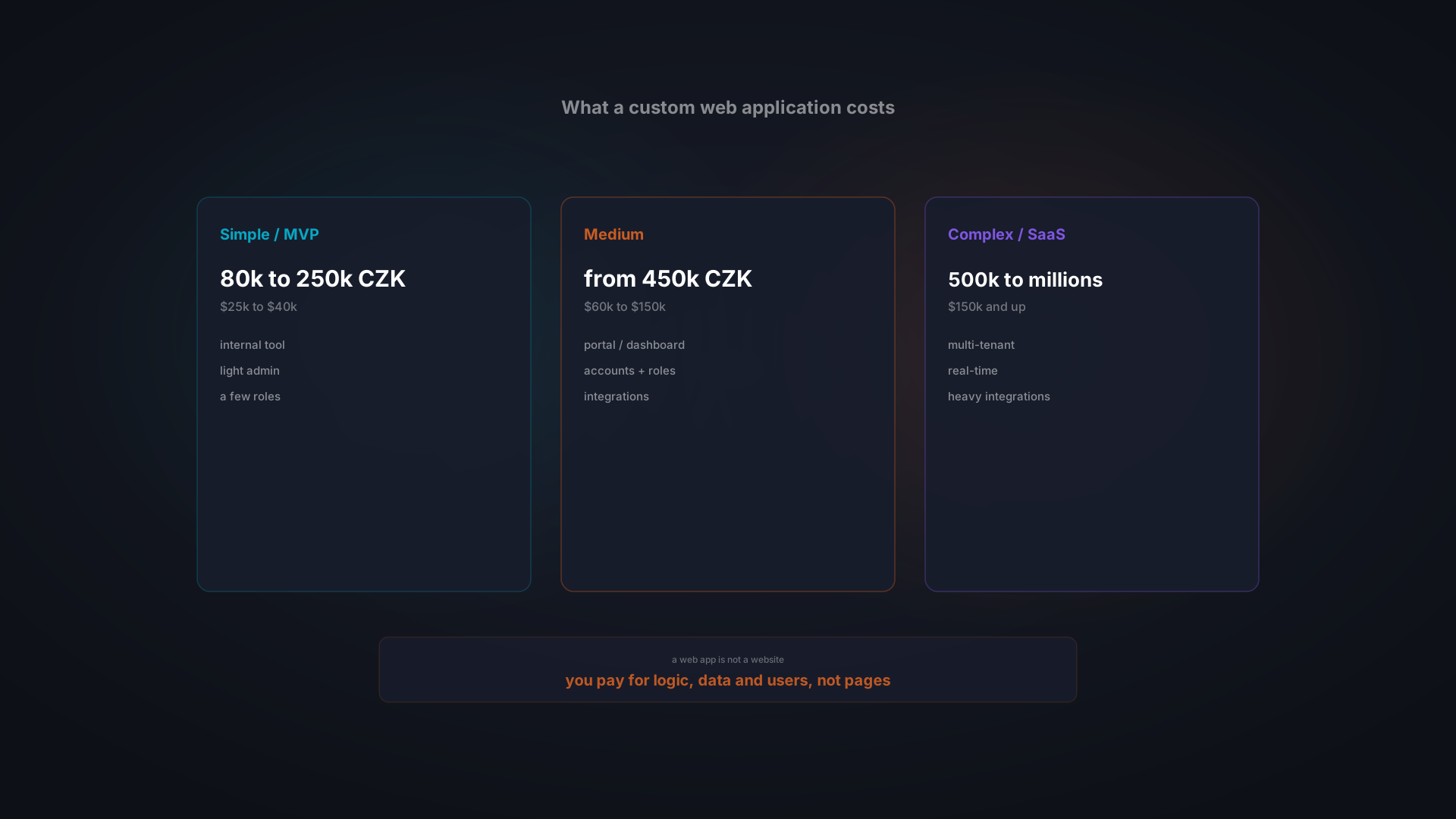
Data migration cost is primarily driven by three factors: data volume, the number of source systems, and data quality. Here are the realistic tiers for 2026, based on industry benchmarks:
- Light migration ($5,000–$12,000, 2–4 weeks): Under two years of data, simple structure, single source. Typical scenario: migrating from a primary spreadsheet set to a new custom system.
- Moderate migration ($12,000–$30,000, 4–8 weeks): Three to seven years of data, multiple sources (spreadsheets + a legacy database + SaaS exports). Typical scenario: consolidating operations that have outgrown their original tools.
- Heavy migration ($30,000–$75,000, 8–16 weeks): Eight or more years of data, multiple legacy systems, complex business logic embedded throughout. Typical scenario: enterprise-grade migration from legacy ERP or database infrastructure.
As a rule of thumb, data migration typically adds 10–15% to a custom software project budget. This is not a place to cut corners. Cheap migration creates expensive cleanup, and the cleanup happens after go-live, when it is maximally disruptive.
What Drives Cost Up
- Data quality: Dirty data requires more cleansing hours. The audit in Phase 1 gives you an accurate estimate of the actual quality, which is almost always worse than expected.
- Number of source systems: Every additional integration point adds complexity, testing time, and edge cases.
- Hidden business logic: Spreadsheet formulas and undocumented database procedures that encode business rules take significant time to reverse-engineer and replicate.
- Compliance requirements: GDPR-compliant migration adds process overhead, but it protects you, and for European businesses it is not optional.
The Cost of Not Migrating
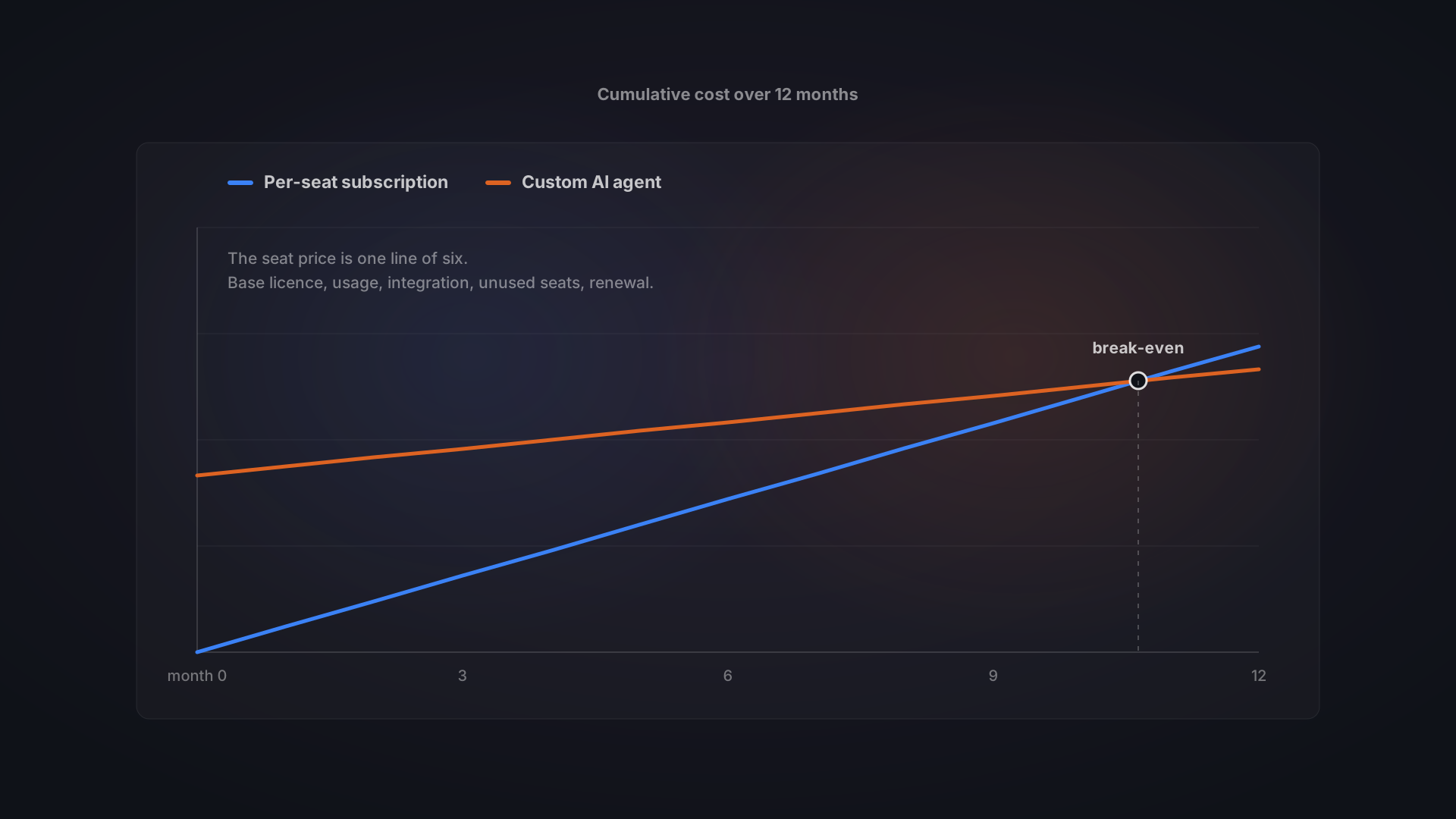
Legacy maintenance consumes 60–80% of IT budgets. That is not budget for building new capabilities: it is budget for keeping old problems alive. According to IDC research, companies migrating to modern infrastructure typically speed up time-to-market by 20–30% and delivery by approximately 40%. One CloveDX case study documented data volumes reduced by 25%, processing speed increased by 33%, and operating costs reduced by 42% post-migration.
ROI timelines are reasonable: 28% of organizations achieve migration ROI within one year. 58% achieve it within two years. The investment is real, the payback is predictable, and the cost of postponing compounds every year you wait.
Data Migration Checklist: 12 Steps to Get It Right
This checklist covers the end-to-end process. Use it to evaluate your own readiness or to assess a migration partner's methodology.
- Inventory all data sources: spreadsheets by file and tab, databases by schema, SaaS exports by available fields, paper records where they exist
- Assess data quality and document issues: duplicates, missing required fields, formatting inconsistencies, broken relationships
- Map data relationships and dependencies across all source systems
- Define what data to migrate and what to archive: apply the selective migration principle
- Design the target schema and document the field mapping rules from old structure to new
- Cleanse and standardize source data before migration begins
- Choose migration approach (Big Bang vs. phased) based on data volume, complexity, and downtime tolerance
- Build and test migration scripts against a representative data sample in a test environment
- Run a full trial migration, validate with automated checks, and fix issues before live execution
- Execute live migration with parallel running where appropriate
- Validate with automated checks AND user acceptance testing by the actual data users
- Monitor data integrity for 30 days post-migration before decommissioning the legacy system
When to Handle Migration Internally vs. Hire a Partner
Not every migration requires external help. Here is an honest decision framework.
You can handle it internally if:
- You are migrating from a single, well-documented spreadsheet with fewer than 10,000 records
- Your team includes someone with database and ETL experience
- The data structure is simple, well-understood, and fully documented
- You have no compliance requirements: no GDPR data residency considerations, no industry-specific regulations
- You have adequate time to run the process properly, without deadline pressure
You need a migration partner if:
- You have multiple source systems: spreadsheets plus a database plus SaaS exports
- Your data contains undocumented business logic accumulated over years
- You cannot afford downtime during migration
- You need to maintain GDPR compliance during the data transfer process
- You are building the new system and migrating simultaneously: this is where a full-service partner adds the most value, because the same team that understands your new custom software architecture handles the migration
- Your total data volume exceeds 100,000 records across all sources
The scenario where a development partner provides maximum value is when you are doing both simultaneously: building a new custom CRM, ERP system, or operational platform and migrating your existing data into it. The same team that designed the target schema executes the migration into it. There is no translation layer, no misaligned expectations, and no handoff risk.
The Bottom Line on Data Migration
Data migration is genuinely difficult. The statistics are real: most projects exceed budget, most first attempts fail, and most failures trace back to avoidable mistakes in planning. Acknowledging that difficulty is not pessimism: it is the starting point for doing the work correctly.
The 73% reduction in failure rates with proper planning is also real. It means that with the right methodology (audit first, clean before migrating, plan the rollback, run in parallel, validate with real users) the outcome is predictable and controllable. Not risk-free, but manageable.
You will not lose your data. With the right partner and the right process, you will end up with cleaner, better-structured, more reliable data than you have ever had. The migration becomes the foundation your new system deserves, not the compromised starting point that undermines everything you built.
Bitvea runs data migrations as part of every custom software project we build. We start with a free data audit (one week, no commitment) that tells you exactly what you are working with, what it will take to migrate, and what the realistic timeline and cost look like. If you are planning a modernization project, talk to us about your migration before you commit to a scope.