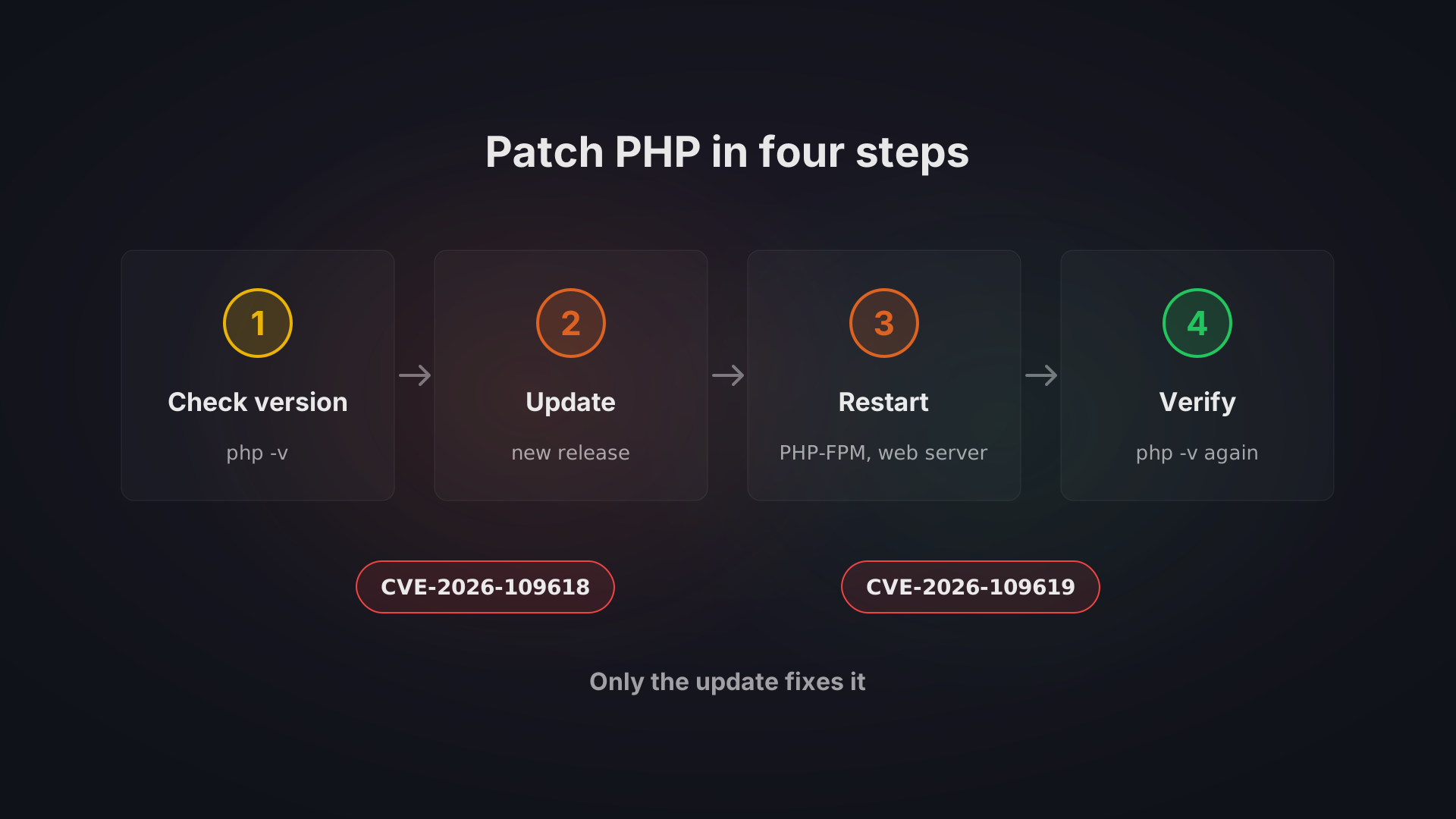
Update PHP to the fixed release of your branch (8.5.12, 8.4.27, 8.3.36 or 8.2.35) or to your distribution's fixed package, then restart PHP-FPM, Apache and every long-running PHP process, because a process that is already running keeps the old code until it restarts. On 21 October 2026 the PHP project released fixes for two critical flaws that can allow unauthenticated remote code execution.
Everything below comes from public sources, read on 22 October 2026, and Bitvea has not tested these steps on a client system for this incident. Hosts, control panels and distributions change their status by the hour, so each status below carries its date. Checked on 22 October 2026.
What happened and why does it matter?
The PHP project tracks the two flaws as CVE-2026-109618 and CVE-2026-109619 and gives them the names "RCE via OOM corruption" and "RCE via stale global state" in its advisory. In the first, an out-of-memory error can interrupt PHP while the data of a request is only partly set up, and the cleanup afterwards treats that data as valid. In the second, internal state that belongs to one request can outlive the memory behind it, and a later request on the same worker may end up using it.
Both can lead to remote code execution without logging in. The advisory for CVE-2026-109618 states the confirmed impact: code runs with the rights of the web worker account, validated against mod_php with default settings. The risk is highest with mod_php, and every setup that serves web requests, PHP-FPM included, is in scope. The PHP security team rated both flaws 9.2 on the CVSS v4.0 scale, and it had pre-announced the release for 14:00 UTC on 21 October.
Whether attackers are already using the flaws depends on whom you read, and the reports differ by hour. Amazon, as relayed by Tenable, saw an attempt on its honeypot on 17 October and says the flaw is broadly exploited. Huntress had seen no exploitation on its partners' systems as of 21 October, 4:30 pm ET, and Rapid7 expects exploitation without reporting it as confirmed. Patchstack records hosting partners reporting incidents on the morning of 21 October, before the release, and only probing, with no hard evidence of breaches, by that afternoon in its own telemetry. Rescana quotes CISA as having observed none at the time of its publication, while listing Amazon and Hadrian as reporting wide exploitation. Do not wait for the sources to agree.
The Czech national cyber security authority NÚKIB recommends updating immediately and says information that enables exploitation is public. Lupa.cz reports that the Czech government office took its websites offline as a precaution from the evening of 21 October until the next morning. If you run WordPress, no WordPress update is needed, because the fix is in PHP, which your host or server provides.
Is your PHP affected, and how do you check?
The NVD record lists as affected every 8.2 release before 8.2.35, every 8.3 before 8.3.36, every 8.4 before 8.4.27 and every 8.5 before 8.5.12. Older branches are covered in the section on PHP 8.1 and older.
First find the version. In WordPress, open Tools, then Site Health, then the Info tab, then Server, where the PHP version is listed. A hosting control panel usually shows it too, and on a server you can run php -v. Trust the number that the website reports while serving a request, because the command line and the web server can run different PHP builds.
Then do not stop at "is my number 8.3.36 or higher". A distribution that backports fixes may be patched while still showing an old-looking version number. Ubuntu 24.04 LTS, for example, is fixed in php8.3 package version 8.3.6-0ubuntu0.24.04.13, per Ubuntu's security page. On those systems the test is the full package string against your distribution's advisory, plus the package changelog.
The PHP project lists affected versions only for 8.2 to 8.5, while Google Cloud's bulletin says everything from PHP 5.4 through 8.5.11. Treat older versions as exposed.
How do you update, by kind of setup?
Pick the block that matches where your PHP lives, and finish it with the check at its end. If more than one applies, for example a shop on hosting and a staging server of your own, repeat for each.
Shared hosting and managed hosting (Plesk, cPanel)
On shared hosting the host decides when PHP is patched. A control panel's PHP selector lists only the versions the host has installed, so a missing fixed release cannot be chosen from it. Ask your host in writing when the fixed release goes live, as a Czech web maintenance firm advises, and keep the answer. Do not install plugins or paste snippets that promise a fix, because Patchstack advises against unofficial fixes.
For status, a vendor-status page read on 22 October listed cPanel EasyApache and Plesk for Linux with fixed packages for 8.2 to 8.5. That is the panel vendor, not your host: your host still has to install the package. After the host confirms, check the version the site reports, as described above.
Debian and Ubuntu
Debian and Ubuntu servers get PHP from the distribution or from Ondřej Surý's packages, the ondrej/php PPA and packages.sury.org. The distribution's packages are fixed under these strings, so compare yours against them:
Distribution | Package | Fixed version |
|---|---|---|
Ubuntu 22.04 LTS | php8.1 | 8.1.2-1ubuntu2.28 (Ubuntu) |
Ubuntu 24.04 LTS | php8.3 | 8.3.6-0ubuntu0.24.04.13 (Ubuntu) |
Ubuntu 26.04 LTS | php8.5 | 8.5.4-0ubuntu1.5 (Ubuntu) |
Debian 12 | php8.2 | 8.2.35-1~deb12u1 (Debian tracker) |
Debian 13 | php8.4 | 8.4.27-1~deb13u1 (Debian tracker) |
The steps below follow Laravel Forge's manual route on Ubuntu, written for PHP 8.4; replace 8.4 with your branch.
- Confirm that your package source file exists in /etc/apt/sources.list.d/.
- Refresh the package lists with sudo apt-get update.
- Run apt-cache policy php8.4-fpm and check that the Candidate version is the fixed one.
- Upgrade every installed package of that PHP version with sudo apt-get install and the options only-upgrade, -y and -o Dpkg::Options::=force-confold, followed by the names of the installed php8.4 packages, which dpkg -l 'php8.4*' lists. Type only-upgrade and force-confold with two leading hyphens, as Forge does. The force-confold option keeps your existing php.ini and FPM configuration.
If the Candidate is not the fixed version yet, wait and try again. Forge says patched packages usually reach those sources shortly after the upstream release, while on 21 October mysites.guru reported that the PPA had no fixed packages yet and that apt refuses to refresh after a changed Release Label unless you add the option allow-releaseinfo-change-label (two leading hyphens) to apt-get update. Both statuses are from 21 October and may have changed.
RHEL, AlmaLinux and Rocky Linux
The PHP project says the Remi repository had no updates on release day and advises its users to take PHP from their distribution instead, or to compile it from source. That is the status of 21 October.
Red Hat's bulletin RHSB-2026-013 covers RHEL 10, 9 and 8 and says some updates are available and more are in progress. A vendor-status page read between 05:41 and 05:50 UTC on 22 October listed RHEL 10 as fixed, the default php on RHEL 9 as fixed with its version still 8.0.30, php:8.4 on RHEL 9 as not yet fixed, AlmaLinux rebuilds in production and Rocky Linux partly done. Check Red Hat's own page before you rely on that.
The sources we read give no exact dnf command for this incident, so this step is generic and not taken from a source: upgrade the installed PHP packages with your package manager's normal upgrade, from the distribution's repositories. Then verify as the same status page suggests. Run rpm -q php php-cli php-fpm, search the output of rpm -q php with the changelog option (two leading hyphens) for CVE-2026-109618 and CVE-2026-109619, and run dnf module list php to see which module stream is enabled on EL8 and EL9.
Docker official php images
The official php image on Docker Hub already has tags for all four fixed versions, in the cli, apache, fpm and zts variants, for example 8.4.27-fpm or 8.2.35-fpm-alpine. An image you built before that keeps the old PHP until you rebuild it. So change the tag in your Dockerfile to a fixed one, rebuild your application image from it and redeploy. Google Cloud's guidance says the same for Google Kubernetes Engine (redeploy the pods) and for Cloud Run (rebuild and redeploy, unless automatic base image updates are on). Check each running container with docker exec followed by the container name and php -v.
Laravel Forge and other managed servers
Forge says its automatic security updates do not patch PHP, because PHP comes from a separate package repository, so you update it on every server yourself. In the Forge dashboard, open the server, then its PHP tab, open the dropdown of the PHP version and choose Update PHP, then confirm. Repeat this for every PHP version installed on the server, including versions no site uses, and expect a few seconds of possible downtime while PHP-FPM restarts. The same applies to any managed server that installs PHP from a separate repository: the panel's routine updates may skip it, so check the version afterwards.
Let an AI coding assistant do it
If you already use an AI coding assistant that can run commands on your server, such as Claude Code or Codex, you can hand it these steps. Paste the prompt below into it. It tells the assistant to find out how PHP runs on your server, compare it with the fixed versions and ask you before every command that changes anything. Two rules still apply: take a backup or snapshot first, and read each command before you approve it. Whatever the assistant runs, it runs on your real server.
You are helping me patch PHP on this server for CVE-2026-109618 and CVE-2026-109619 ("php2shell"). The fixed releases came out on 21 October 2026: PHP 8.5.12, 8.4.27, 8.3.36 and 8.2.35.
Work step by step and ask me before every command that changes the system.

1. Find out how PHP runs here: the operating system and its version, every installed PHP version (command line and web), and whether PHP runs as PHP-FPM, Apache mod_php, CGI, FrankenPHP, LiteSpeed or in Docker. Show me the version the website actually uses, not only the output of php -v.
2. Check whether each installed PHP version is fixed. For Debian, Ubuntu or RHEL-family packages, compare the full package version with the distribution's security advisory, because distributions backport fixes without changing the PHP version number.
3. If anything is not fixed, propose the exact update commands for this server (distribution packages, the ondrej/php or packages.sury.org repository, Remi, or a new Docker image tag) and wait for my approval.
4. After the update, restart every service that runs PHP: PHP-FPM, Apache, queue workers and any other long-running PHP processes.
5. Verify the result: show me the PHP version the web server reports after the restart and confirm it is a fixed release or a fixed distribution package.
6. If the update cannot happen today, tell me which temporary settings reduce the risk (for example session.upload_progress.enabled = 0 in php.ini) and what they do not cover.

Do not change application code, do not delete anything, and stop and ask me if anything looks unexpected.
How do you restart and verify the fix?
An upgrade replaces the files, and processes already running keep the old code. On Forge, the package upgrade restarts PHP-FPM, but long-running processes started from the command line, such as queue workers, Horizon, Octane and Reverb, keep the old PHP until you restart them. Rescana also notes that updating an application does not update the PHP runtime beneath it, and watchTowr advises to restart every PHP worker after installing the update. So restart Apache, PHP-FPM and every worker your setup runs. Node.js behaves the same way, and our Node.js update guide for the Brotli flaw covers the restart for systemd, PM2 and containers.
Then verify:
- Run php -v again, then php-fpm8.4 -v (with your branch number) to confirm that PHP-FPM itself runs the patched version.
- On Debian and Ubuntu, run apt-cache policy php8.4-fpm, and on RPM systems the commands above, and compare the full package string, not the number from php -v.
- Look at the version the website reports while it serves a request, because it can differ from the command line.
- Check containers and backup instances too, as CSIRT.CZ at CZ.NIC advises for every environment where PHP runs.
CSIRT-MU adds that temporary measures do not remove the flaws or replace the update.
What if you cannot update today?
PHP says that there are no complete mitigations and that updating is the only safe choice. What follows reduces exposure on separate paths, and each setting leaves others open. Treat it as a stopgap until you can update.
For CVE-2026-109619, PHP advises setting session.upload_progress.enabled=0 in php.ini, an FPM pool or a server configuration that applies before request parsing, and restarting every worker. Setting it with ini_set() or in an FPM .user.ini file does not count. It blocks the confirmed session paths only, and PHP's own advisory says no complete generic configuration mitigation exists. The setting does nothing for CVE-2026-109618. On PHP 8.5, PHP also advises fatal_error_backtraces=0 with a restart, which covers one more confirmed path.
For CVE-2026-109618, set memory_limit=-1 so applications cannot override it, with php_admin_value in the FPM pool or the Apache configuration, and keep post_max_size low. Use a container or cgroup limit as the boundary for availability, and do not substitute RLIMIT_AS or RLIMIT_DATA, which can themselves cause the vulnerable failure. watchTowr goes further and says that .ini changes are not an effective mitigation, so do not read any one setting as safe.
On shared hosting, skip the unofficial fix plugins and snippets, as Patchstack advises.
What about PHP 8.1 and older?
PHP 8.1 and older no longer get updates from the PHP project. The PHP security team did publish minimal source backports of the fixes for 7.4, 8.0 and 8.1, as git branches meant for those who compile PHP themselves or have no LTS vendor. Some distributions and LTS vendors ship their own backported fixes. So the first question is whether your distribution or LTS vendor has one for your version; Plesk and cPanel list backports for 7.4, 8.0 and 8.1 in the status page read on 22 October. Versions 5.4 to 7.3 are end of life, and Tenable says there is no fix for them from the PHP project.
PHP 8.2 gets its fix now, but it reaches end of life on 31 December 2026, after which it will receive no security fixes. Plan its replacement as well.
Where nothing can be patched, Huntress advises isolating or firewalling the system and applying PHP's session.upload_progress.enabled advice, which, as above, covers one path only. WordPress.org and the UK NCSC, as quoted by Codeable, suggest considering taking the site offline until it is fixed. The lasting answer is a move to a supported release. Test it on a staging copy first and take a full backup before you switch. A server that has run old software for years, which our post on outgrown tech stacks describes, often has more than PHP to replace.
If you get lost, we can help
On many setups, you can update PHP for CVE-2026-109618 and CVE-2026-109619 yourself. It gets harder when the hosting is unclear, the PHP version is old, or you have several servers.
Once the fix is live, a retest is worth having. Our penetration testing service includes a retest after your team fixes issues, to confirm each one is resolved, and we can help implement fixes or review proposed solutions. If you want to know what such a test covers, read white-box versus black-box penetration testing.
Part of a topic guide