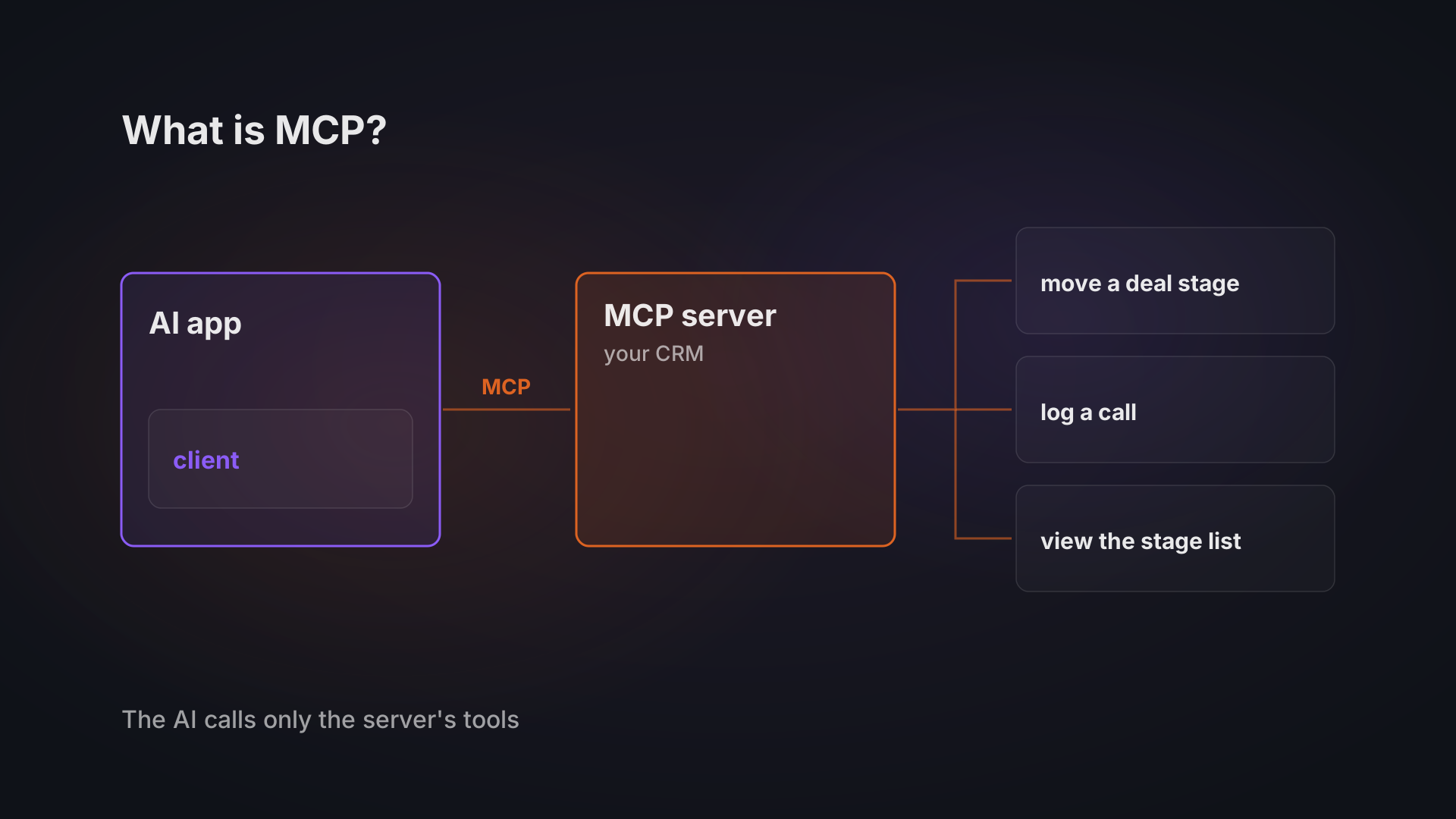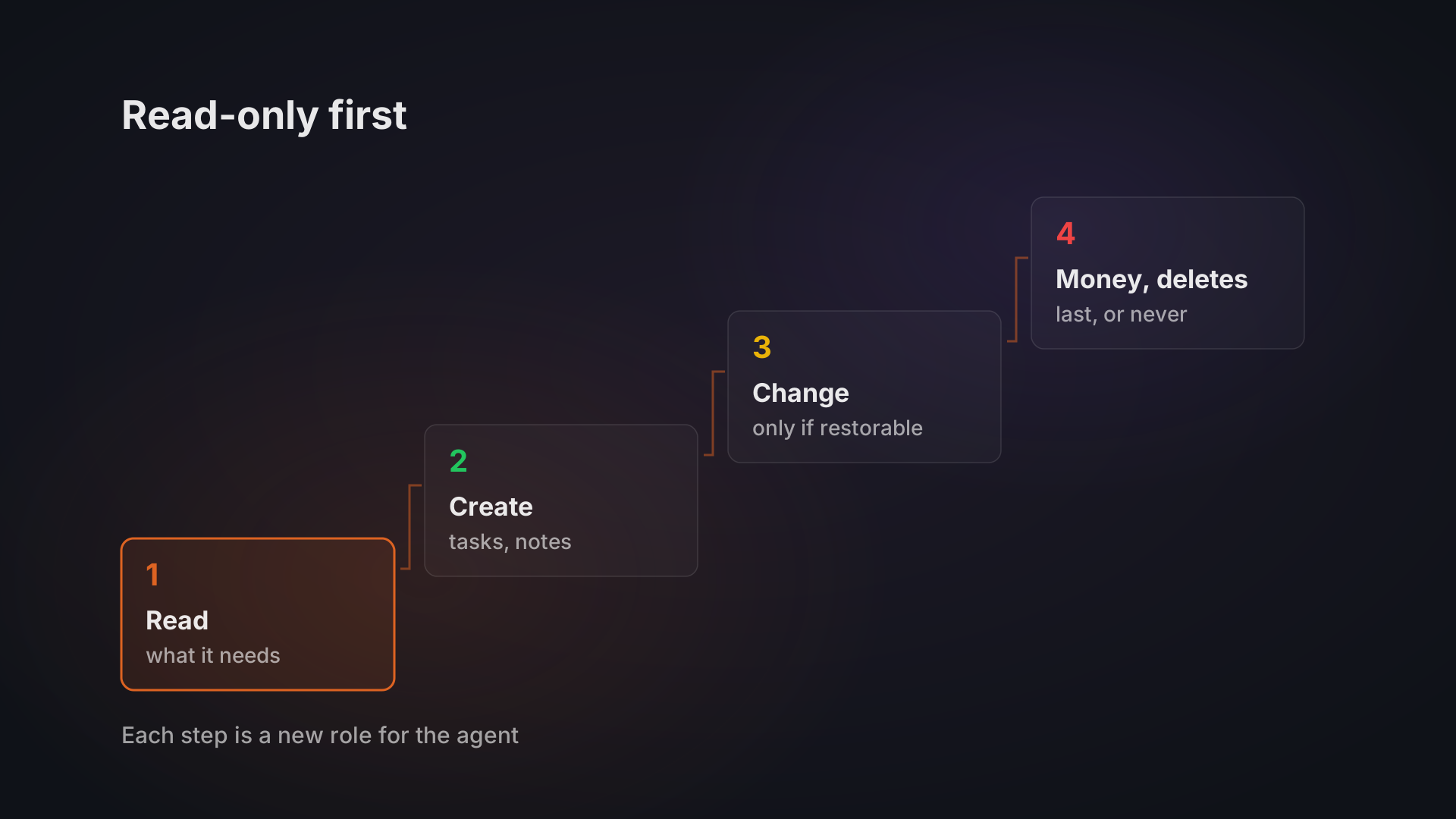
When I connected Claude to my car's diagnostic port, I made the MCP server read-only. MCP is the protocol an AI assistant uses to call the tools of another system, and I left out every tool that could change the car's state. The same order works in a CRM or ERP. Start the agent on read access, through its own user, one module at a time. Give it write access first where a change can be undone and is logged. Leave money, prices and permanent deletes for last, if you ever hand them over.
An agent that can only read can give you a wrong answer. An agent that can write can give your customer a wrong invoice.
Read-only first: hidden tools, reversible writes and a test for each step
The usual advice is sound: least privilege, a service account, an audit log. What it rarely says is what makes each step safe to take. Here that is four things: tools hidden for modules the agent has no right to, a soft delete as the first write, unmatched values reported back instead of written, and a shadow run before any write goes live. Every step in the ladder below ends with a test you can run before moving up.
First, what read-only means in practice. In a business system, access is a set of switches, a pair for every module. In Bitvea CRM, our own CRM, every module has its own read permission and its own write permission. An AI assistant connects to it over MCP under a role: if that role has read-only access to contacts, the assistant is read-only for contacts too. How MCP itself works, and why it leaves permissions to the server, is covered in what MCP is.
A module the role has no access to goes one step further. The assistant does not even see that module's tools, so there is nothing there for it to call.
This is the question to put to anyone who connects an agent to your system. Is access set per module and per action in the system itself, or is it a sentence in the agent's instructions? A sentence in the instructions is a request. A permission on the role is a limit.
In what order to open things up
Open access in four steps, from reading to changes that cannot be undone, and move up only when the current step runs without surprises. Take an operations manager at a 30-person distributor who wants an agent in the CRM and the ERP; the ladder below is a worked example of the order we recommend rather than a client case.
Step | What the agent may do | For example | Move up when |
|---|---|---|---|
1 | Read the records it needs | "Which deals have had no activity this month?" | its answers match what your team finds by hand |
2 | Create new low-risk records | tasks, reminders, call notes | people use what it creates without fixing it |
3 | Change records that can be restored | delete a contact (a soft delete, so it can be restored) | nothing it changed needed fixing by hand |
4 | Touch money and permanent deletes, last or never | invoices, payments, prices, permanent deletes | never on its own: a person approves every one |
Each step is a change of role, not a change of prompt. Plenty of useful work fits in steps 1 and 2: answering questions about your data, and drafting what a person then checks.
If you are not sure which process to hand over first, start with the one that is mostly reading.
Give the agent its own user, a key that expires and an off switch
Never connect an agent with your own login, or with the login of whoever set it up. In our CRM an admin can create a dedicated bot user for an automated integration, one that is not tied to a real person. The agent's access then sits on its own role, not on a person's account.
The key the agent connects with can be set to expire automatically when it is created. For a pilot, set the expiry to the end of the pilot, so a forgotten experiment does not keep its access for a year.
The off switch is the same key. Revoke it, and the server refuses every call made with it. Decide in advance who may revoke it, and make sure that person knows where the button is.
Make every write reversible, and let the agent refuse to guess
When the agent gets its first write access, start where a mistake costs one click to fix. In our CRM, a contact the agent deletes is only soft-deleted and can be restored.
The second rule is about values the system does not recognise. Agents are good at producing a plausible name for something, and a plausible name that does not exist in your data is worse than no name. Ask for a system that reports such a value back instead of saving it: a customer it does not know, a product code missing from the catalogue, a price list that does not exist. Our CRM already works this way for one of its shared lists: a name the agent sends that matches nothing is not saved, and the system reports it back as unmatched.
The car server followed the same rule from the other side. Its repository has a guarded command that changes state, and it requires explicit confirmation. I did not use it, and I would not include it in a truly read-only profile.
Test it in shadow mode before it writes for real
The test before any write access is to let the agent propose and a person decide. In our AI customer support project, before the agent answered a single customer, it ran in shadow mode: it drafted replies to live tickets, and the support team reviewed and corrected them before anything was sent. Nothing reached a customer that a person had not seen first.
Two more things from that project carry over to a CRM or ERP. An angry or ambiguous message, a billing dispute or a weak match goes straight to a human, with the AI's draft attached. And the agent logs every action it takes, so there is a full audit trail.
Narrow, named tools are what make that log useful. In the car experiment, every step was visible: Claude's request, the adapter's reply, and where the final explanation came from. An agent with a few named tools gives you that. An agent with a database login gives you a pile of queries.
Where read-only stops being enough
Read-only has three limits.
Reading still exposes data. An agent that reads your contacts reads names, emails and phone numbers, and sends what it reads to a language model. In the support project, sensitive fields are stripped out before any text reaches the language model. Give read access to the modules the task needs, and nothing else in the system.
Read-only does not make the agent right. It can misread a deal and tell you something false with confidence. That is why the shadow period and the hand-off to a person exist even for an agent that writes nothing.
Some jobs are writing. If the job is logging calls or entering supplier invoices, a read-only agent saves little. Move to step 2 sooner, with drafts a person approves, rather than giving up on the agent or skipping straight to step 4.
If you are weighing an agent for your CRM or ERP, tell us the system and the task you have in mind. Our AI agents work starts from 80,000 CZK, and we can start the conversation from what your team does by hand today.