The average organization runs 897 applications. Only 29% of them are connected. For a growing business with 10 or 15 tools, that gap is just as painful: your team becomes the integration layer, spending hours every day moving data between systems by hand. That is not a productivity problem. That is a structural one.
According to research by Integrate.io, employees spend 8 hours per week searching for and moving data across disconnected systems, more time than they spend making actual decisions with that data. For one Czech e-commerce company processing 150+ orders a day across four channels, the cost of disconnected systems was not abstract: a 12% error rate was producing roughly 18 mis-shipments per day, adding up to over $280,000 per year in returns and re-shipping costs alone.
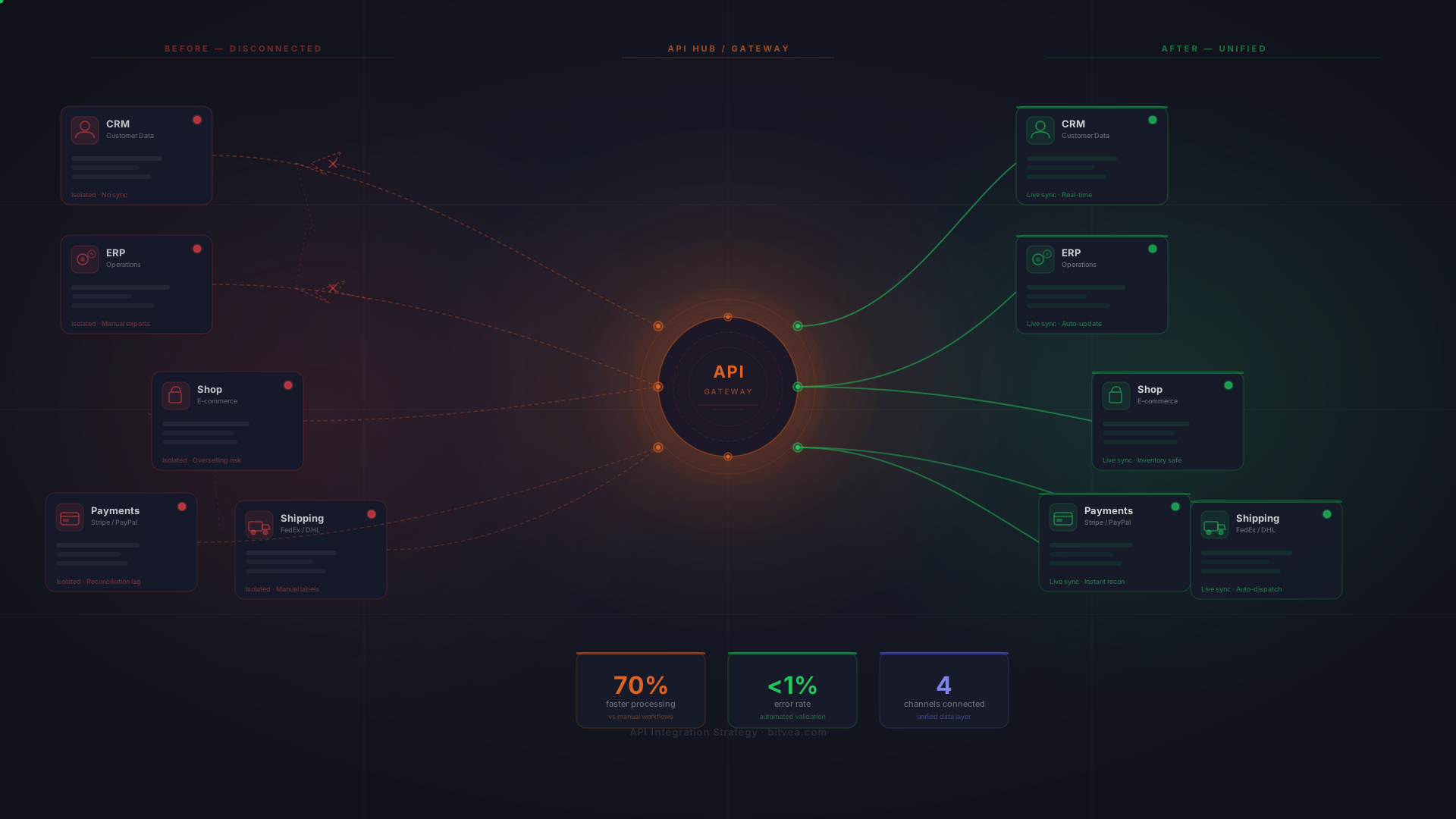
An API integration strategy connects your CRM, ERP, e-commerce, accounting, and shipping systems into a single automated data flow, eliminating manual work, reducing errors, and giving your team one reliable source of truth. This guide covers the three main approaches, which integrations deliver ROI first, what a real build looks like, and how to decide which path is right for your business.
What an API Integration Strategy Actually Means for Your Business
Strip away the technical terminology and an API integration strategy is simply a plan for how your business systems share data automatically. Instead of your team acting as the messenger between tools, copying an order from your e-commerce platform into your accounting system, manually updating inventory after a sale, pasting customer data from your CRM into your support desk, the systems talk to each other directly.
The goal is not technology for its own sake. The goal is eliminating the manual work that sits between your tools: the copy-paste routines, the CSV exports, the end-of-day reconciliation runs, the "did this order get invoiced?" questions your team fields every morning.
The Real Cost of Disconnected Systems
The cost of unconnected systems rarely shows up on a single invoice, but it compounds every month. Appian estimates that data silos cost organizations $7.8 million annually in lost productivity. Companies lose 20–30% of revenue annually due to data silo inefficiencies. 87% of organizations report struggling with disconnected data sources.
There is also the error cost. When people manually move data between systems, mistakes happen. A wrong inventory count leads to an oversold product. A missed invoice means delayed payment. A data entry error in a shipping address means a return. These are not edge cases: they are the daily reality of businesses running on disconnected systems. If you recognize the signs your business has outgrown its tech stack, integration debt is likely already compounding.
84% of integration projects fail or partially fail, not because of bad technology, but because of poor planning. The businesses that succeed treat integration as a business decision first and a technical project second. That distinction matters for everything that follows.
The Three Approaches to Business System Integration
Not every business needs the same integration approach. The three main options are no-code iPaaS tools, enterprise platforms, and custom API development. Each serves different stages of growth and different levels of complexity. Here is an honest breakdown of each.
iPaaS and No-Code Tools (Zapier, Make, Workato)
Platforms like Zapier and Make connect applications through pre-built connectors and visual workflow builders. No developers required. Zapier alone offers connectors for 5,000+ applications. For simple automations, sending a Slack notification when a form is submitted, adding a CRM contact from an email, these tools are genuinely excellent.
- Best for: Simple, unidirectional data flows; small teams; 1–3 connections
- Strengths: Fast setup, no developers needed, 5,000+ pre-built connectors
- Limitations: Single-directional data transfer, limited complex business logic, no version control, task-based pricing escalates with volume
- Cost: $50–$750/month depending on task volume and features
The ceiling becomes visible when you need bi-directional sync, when your business logic requires conditional routing, or when you are processing high volumes of transactions. A Zapier chain that worked fine at 20 orders per day starts breaking at 200. At that point, you are spending more time maintaining your Zaps than they are saving you. The question to ask: are you working around your automation tool, or is it working for you? For a deeper look at why custom software beats SaaS for growing businesses, the same logic applies here.
Enterprise Integration Platforms (MuleSoft, Boomi, Informatica)
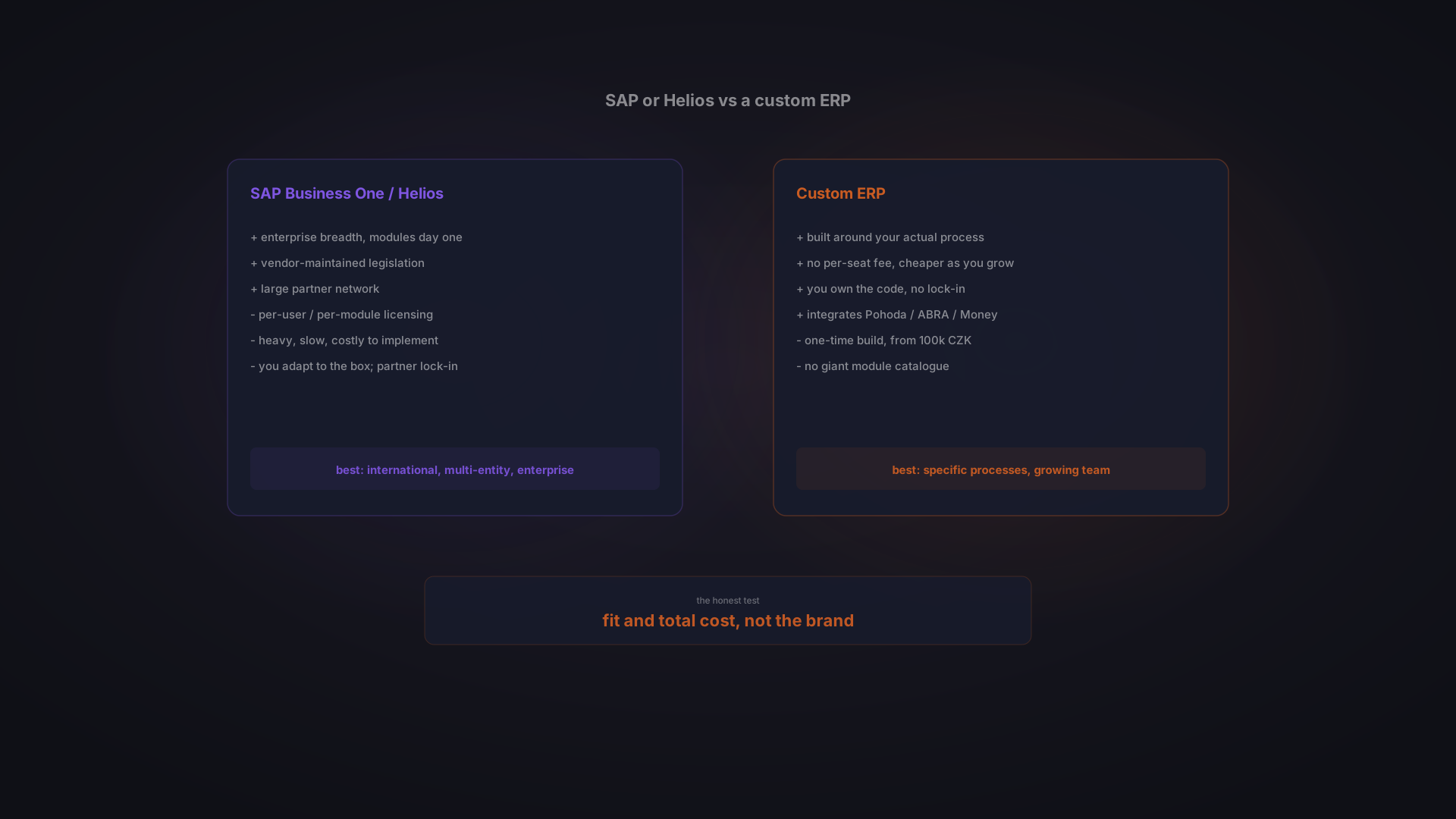
Enterprise iPaaS platforms offer comprehensive, API lifecycle management, robust security, and the ability to connect hundreds of systems across large organizations. They are genuinely powerful tools, for the organizations they were designed for.
- Best for: Large enterprises with hundreds of systems and dedicated IT teams
- Strengths: Enterprise-grade security, full API lifecycle management, extensive governance features
- Limitations: $50,000–$150,000+ annually in licensing, 3–6 month implementation timelines, requires specialized developers
- Reality: Not practical for businesses with 20–200 employees
If you are running a business with a dozen core systems and a team of 50 people, MuleSoft is a Formula 1 car when you need a reliable van. The licensing cost alone exceeds what most growing businesses invest in their entire software stack.
Custom API Integration (Built for Your Business)
Custom API integration means building a tailored system that connects your specific tools, implements your exact business logic, and handles your actual data volumes. It requires upfront investment and a development partner who understands both your operations and the APIs involved, but it is the option that scales without ceiling and costs without per-transaction fees.
- Best for: Growing businesses with 3–10 critical system connections, bi-directional sync requirements, complex business logic, or regional system integration (Czech accounting, European shipping)
- Strengths: Built for your exact workflow, handles complex business rules, full ownership, scales with no per-task fees, connects any system with an API
- Cost: $5,000–$25,000 per integration depending on complexity; typically breaks even within 6–12 months
- Timeline: Single integration: 1–3 weeks; multi-system platform: 6–12 weeks
This is the approach Bitvea takes when building custom software solutions for growing businesses: custom integration built around your workflow, not a workflow bent around a platform's constraints.
Which Systems Should You Integrate First? A Priority Framework
The most common mistake companies make with system integration is trying to connect everything at once. A phased approach, starting with the highest-impact integrations and validating ROI before expanding, delivers faster results and lower risk. Here is a practical priority framework.
Tier 1: High Impact, Connect First
- CRM + accounting/invoicing: eliminates double data entry for every deal closed; invoices generate automatically from CRM records
- E-commerce + inventory/warehouse: prevents overselling, enables same-day fulfillment, eliminates manual stock checks
- E-commerce + accounting: auto-generates invoices from orders; works with Czech systems like Fakturoid, Pohoda, and ABRA Flexi
Tier 2: High Value, Connect Next
- CRM + email/marketing automation: unified customer journey from first contact to closed deal
- ERP + supplier/procurement systems: automated purchase orders triggered by inventory thresholds
- Shipping providers + order management: automated label generation, real-time tracking updates pushed to customers
Tier 3: Strategic, Plan Ahead
- BI tools + all data sources: unified reporting dashboards pulling from CRM, ERP, e-commerce, and finance in real time
- HR/payroll + operational systems: resource planning and cost allocation across projects
- Customer support + CRM + product data: 360-degree customer view for support and sales teams
To score which integration to build first, evaluate each candidate against five factors: hours saved per week (highest weight), error reduction potential (high), direct revenue impact (medium), implementation complexity (medium), and daily data volume (lower). Start with the integration that scores highest on hours and errors: those are the ones where the ROI is clearest and fastest.
Real Results: Connecting 4 Sales Channels in 8 Weeks
A Czech e-commerce company was processing 150+ orders per day across four sales channels: their own web store, Heureka, Mall.cz, and wholesale partners. Every order was processed manually. Three staff members spent 6+ hours daily on data entry: cross-checking inventory, creating invoices, generating shipping labels, and reconciling channel-specific order formats. The error rate was 12%. At roughly $43 per mis-shipment in returns, re-shipping costs, and labor, that was over $280,000 per year in avoidable losses.
The solution was a custom integration platform connecting all four channels through a normalized order intake pipeline. Real-time inventory synchronization used Redis pub/sub to push stock updates across all channels simultaneously. Invoicing automated through the Fakturoid API: every order generated a compliant invoice without human intervention. Shipping automation connected Zasilkovna and PPL APIs, generating labels and sending tracking updates automatically.
The build approach was deliberately incremental. Each channel adapter was deployed to production and validated with real orders before the next was started. The team could verify the integration was working correctly at each step rather than running a high-risk big-bang deployment at the end.
- 70% faster order processing: from intake to shipping label in minutes instead of hours
- Error rate: 12% down to <1%: automated data handling eliminated manual entry errors
- Same-day fulfillment: replacing a 2-day average turnaround
- 2 FTEs freed: staff redirected to supplier negotiations and catalog expansion
- 8 weeks from kickoff to production: incremental deployment, one channel at a time
The technology stack: Next.js, Node.js, PostgreSQL, Redis, TypeScript, Docker, and AWS. The system was built to accommodate additional channels and integrations as the business grew, and the client later added new product lines without rebuilding the core platform.
The error-related costs alone, over $280,000 per year, dwarfed the integration investment. The ROI case did not require a complicated calculation. It just required counting the mis-shipments.
How Much Does API Integration Cost?
Cost is the question every decision-maker asks first. Here is a realistic breakdown for growing businesses, not enterprise pricing from US analyst reports.
Cost Ranges by Complexity
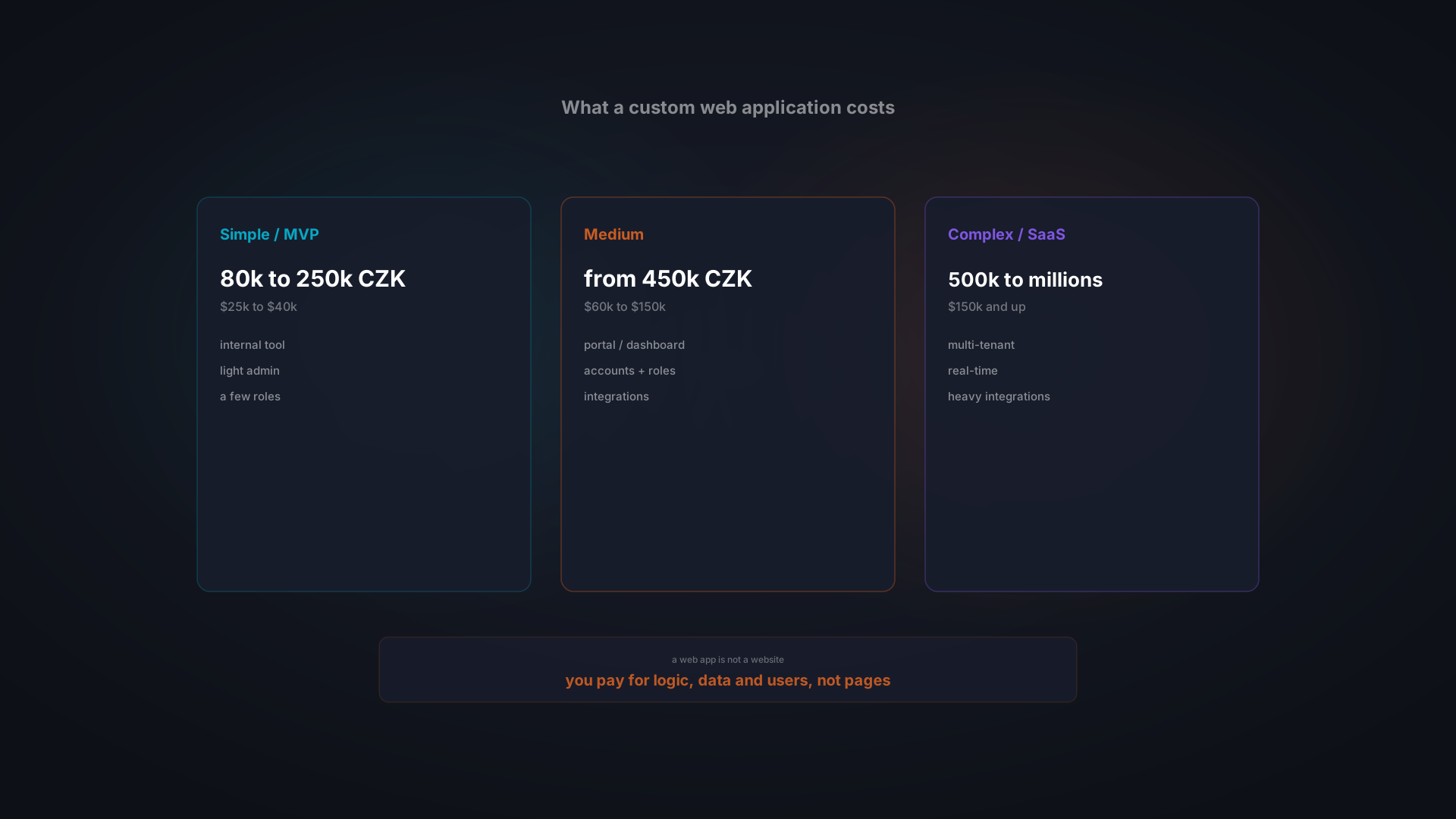
- Simple (one-way sync): $2,000–$8,000, 1–2 weeks, email + CRM notifications, basic payment webhook, one-directional data sync
- Mid-complexity (bi-directional): $8,000–$25,000, 2–6 weeks, CRM + ERP sync, e-commerce + inventory, accounting integration
- Complex (multi-system orchestration): $25,000–$60,000, 6–12 weeks, multi-channel order automation, full ERP integration, real-time dashboards
Central European development rates (Czech Republic, Slovakia, Poland) run at $40–$80 per hour, delivering the technical depth of Western teams without the North American price tag of $100–$200 per hour. For a business connecting 3–5 critical systems, the total investment typically falls in the $40,000–$80,000 range, with maintenance running 10–15% of the build cost annually.
Custom Integration vs Zapier: A 3-Year Cost Comparison
The comparison that matters is not month-one cost: it is total cost of ownership over the period you plan to use the integration.
- Zapier Business Plan, 5 integrations, Year 1: $6,000 subscription + ~$5,000 setup and configuration time = $11,000
- Zapier, Year 2: $6,000 subscription + ~$3,000 workarounds and maintenance = $9,000
- Zapier, Year 3: $6,000 + ~$5,000 hitting limits and rebuilding flows = $11,000
- Zapier 3-year total: ~$31,000: with growing limitations and no ownership
- Custom integration, Year 1: $40,000 build
- Custom integration, Year 2 and 3: $6,000/year maintenance
- Custom 3-year total: ~$52,000: with full ownership, no transaction limits, and a system built for your workflow
At high transaction volumes, the Zapier number climbs faster due to task-based pricing. The custom build cost stays flat. Beyond the three-year mark, the custom option is structurally cheaper, and it is the only option that handles complex business logic without workarounds.
What Drives Integration Cost Up (and How to Control It)
- Poorly documented third-party APIs: adds discovery and reverse-engineering time; ask for API documentation before scoping
- Scope creep: starting with 3 integrations and adding more post-launch; scope the MVP tightly
- Legacy systems without modern APIs: screen scraping or file-based imports are expensive to build and maintain
- Bi-directional sync with conflict resolution: harder than one-way; budget extra time for data mapping
- Annual maintenance: plan for 10–15% of initial build cost to cover API compatibility updates and minor changes
Common Objections: Honest Answers
"Zapier Already Works for Us"
It might, and if it does, keep using it. Zapier is genuinely good for simple, unidirectional automations. The signal that you have outgrown it: you are spending time maintaining Zaps instead of running your business. Tasks fail silently. You have built workarounds for your workarounds. Data inconsistencies appear between systems. When the tool is creating work rather than eliminating it, it has hit its ceiling for your use case.
"It's Too Expensive to Build Custom"
Reframe the question. The relevant calculation is not what the integration costs to build: it is what the current manual work is costing you. Take the hours your team spends on manual data entry and cross-system reconciliation, multiply by fully-loaded salary cost, and multiply by 52 weeks. Add error costs. Most businesses find that a single well-scoped integration pays for itself within 6–12 months. You are already paying for the disconnected systems. The cost is just invisible.
"It Will Take Too Long"
A single integration can be live in 1–3 weeks. The e-commerce case study above connected four channels and went to production in 8 weeks, deployed incrementally, one channel at a time. For comparison, enterprise iPaaS implementations (MuleSoft, Boomi) typically run 3–6 months. The incremental approach is faster and lower risk than any big-bang deployment.
"What If Third-Party APIs Change?"
API changes are inevitable. A well-built integration handles this through the adapter pattern: each third-party connection is isolated in its own module. A change to the Heureka API does not touch the Mall.cz adapter or the invoicing flow. Monitoring and automated alerts catch breaking changes before they impact operations. Ongoing maintenance agreements cover compatibility updates as a standard part of the engagement.
Is Custom API Integration Right for Your Business?
Use this checklist to decide. There is no universally right answer: the goal is honest fit assessment.
Custom API integration makes sense if:
- You have 3+ business systems that need to share data in both directions
- Your team spends hours daily on manual data entry or copy-paste between tools
- Zapier or Make cannot handle your business logic: conditional routing, bi-directional sync, or high-frequency data
- You need to connect local or regional systems (Pohoda, ABRA Flexi, Fakturoid, Zasilkovna, PPL) alongside global platforms
- Error rates from manual processes are costing you measurable money
- You want to own the integration and eliminate escalating subscription fees
- You plan to add more systems, channels, or markets in the next 1–2 years
Stick with Zapier or iPaaS if:
- You need 1–2 simple, unidirectional automations
- Data volumes are low, under 100 transactions per day
- Your workflows are standard and require no custom business logic
- Budget for a development partner is not available right now
- Speed matters more than customization, you need something working this week
If you are unsure which category you are in, start by calculating the hidden cost of your current manual processes. The answer usually becomes clear. You can also read more about building custom software solutions or building a custom CRM for related decision frameworks.
Connecting Your Systems: The Path Forward
An API integration strategy is not a technology project. It is a business decision about eliminating the hidden cost of disconnected systems: the hours wasted on manual data entry, the errors that generate returns and complaints, the decisions delayed because the right data is not where it needs to be.
The numbers are clear. Organizations with only 29% of their apps integrated are paying for the gap every day. Employees spending 8+ hours a week moving data instead of using it are a direct cost. A 12% error rate at 150 orders per day is $280,000 a year. The integration investment pays for itself.
The practical approach: start with your highest-impact integration, prove the ROI, then expand. The e-commerce case study connected four channels in 8 weeks and freed two full-time employees for work that actually grows the business. That is the incremental path, not a grand digital transformation, but a series of targeted integrations that each deliver measurable value.
Bitvea builds custom API integrations and software for growing businesses across the Czech Republic and Europe, connecting Czech and European systems (Pohoda, ABRA Flexi, Fakturoid, Zasilkovna) alongside global platforms (Stripe, Shopify, HubSpot, Salesforce). If your team is spending time on work that connected systems should handle automatically, talk to us about connecting the systems that run your business.